Bills and collections
Bulk bills by charge head, UPI payments, receipts and defaulters. See maintenance billing.
Run several societies on one platform while each committee sees only its own flats, bills and books. Give the auditor a read-only login, and load members, balances and bank statements in bulk. Part of SocietyConnect, free for 90 days.
A facility manager in Kharghar runs six societies from six Excel files, three WhatsApp groups and one overworked accountant.
When one company manages several societies, the work multiplies and so do the mistakes. Bills are made in one sheet and receipts in another. The auditor gets a pen drive at year end. Each committee asks for a different report, and nobody wants society A’s data showing up in society B’s inbox.
SocietyConnect runs every society as its own account on one platform. Flats, members, bills, receipts and books never mix between societies, and every person sees only what their role allows. A township with several towers can sit in one society with wings grouped by sector. The auditor reads the books from a login that cannot change anything.
| Login | Which societies | Money and books | Members and flats | Gate |
|---|---|---|---|---|
| Platform login | Opens any society on the platform, one at a time | Full, inside the society it has open | Full, inside the society it has open | Gate log and settings |
| Committee | Its own society only | Bills, payments, accounts, reports | Add, edit, approve join requests | Gate log, blacklist, guard logins |
| Auditor | The society that invited them | Read everything, change nothing | Read only | Read only |
| Guard | The society that created the login | None | Flat list for visitor entry | Visitors, patrol, daily help, incidents |
| Resident | The society they joined | Their own flat’s bills and payments | Their own household and the directory | Approves visitors to their flat |
Today the platform login is held by the Infoways team, who use it to set up and support each society. Tell us how your company works and we plan access with you during setup.
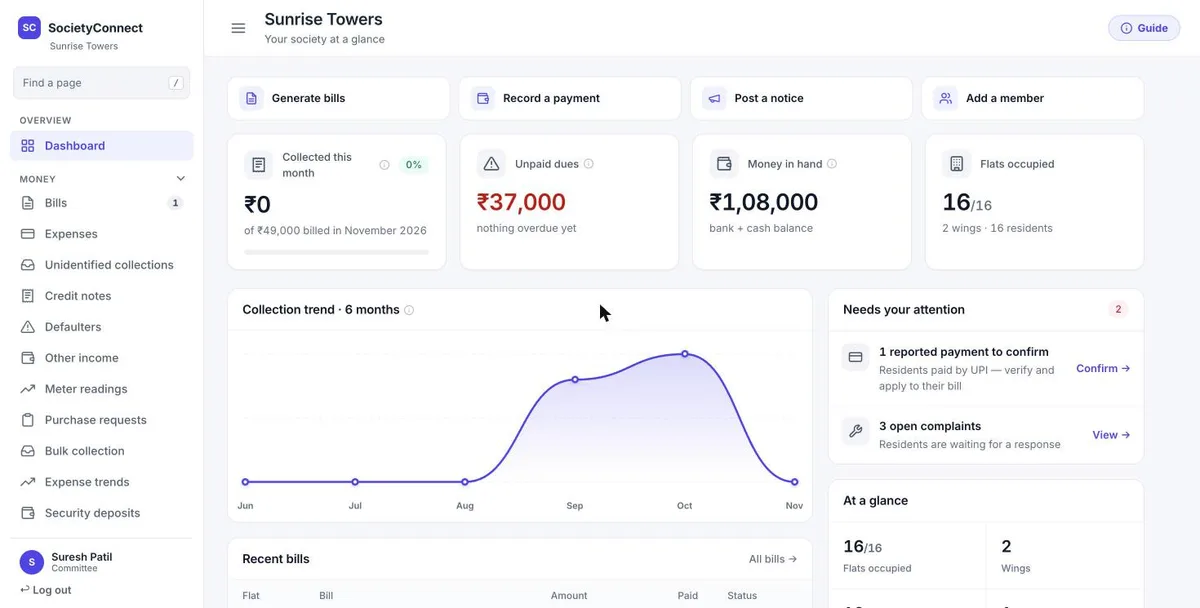
A manager or committee member lands on the society’s dashboard. Four shortcuts sit at the top: generate bills, record a payment, post a notice and add a member. Below are this month’s collection, unpaid dues, money in hand and flats occupied, a six-month collection trend and a list of what needs attention, such as reported payments to confirm and open complaints.
Bulk bills by charge head, UPI payments, receipts and defaulters. See maintenance billing.
Double-entry accounts, bank reconciliation, GST and TDS, with Tally XML export. See society accounting.
Purchase requests, vendor payments and work orders. See vendors and purchase.
Staff roster, muster roll, payroll, payslips and ID cards. See daily help and staff.
Guard logins, patrol checkpoints, SOS alerts and incidents. See security guard app.
Complaints, notices, meetings and amenity bookings. See complaint management.
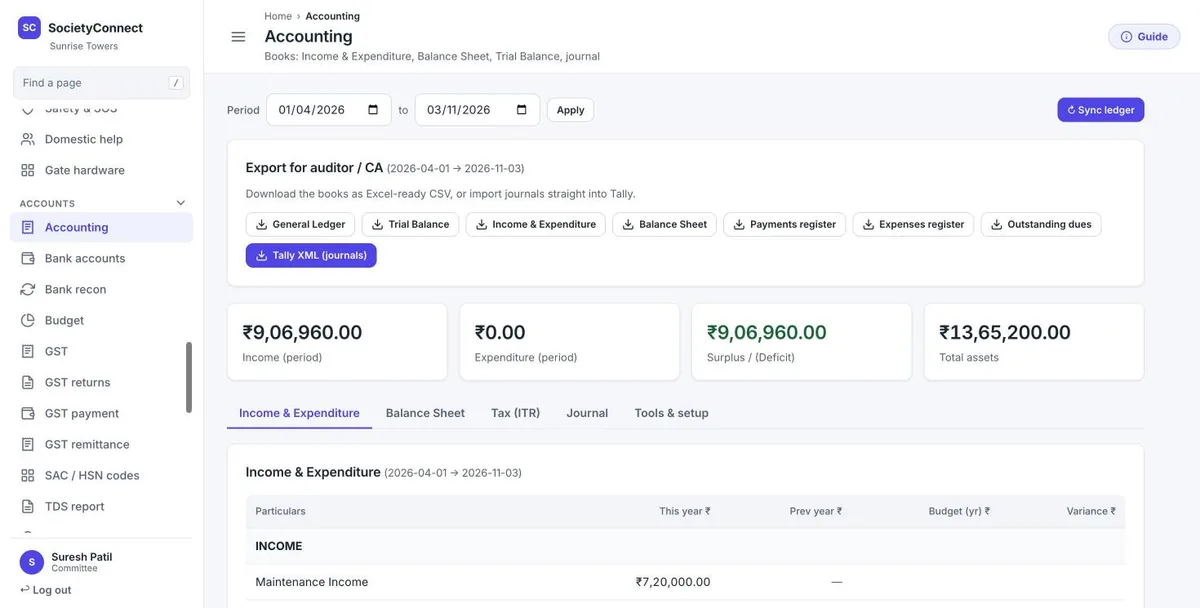
The committee adds an auditor from the Auditors page. The auditor signs in to the same web dashboard and can open every page, from the trial balance to the flat ledgers and the audit trail. Any attempt to change something is blocked with a message that auditor access is read-only.
For the CA’s own tools, the Accounting page exports the general ledger, trial balance, income and expenditure, balance sheet, payments and expenses registers and outstanding dues as Excel-ready CSV, and journals as Tally XML.
We start with the society that has the cleanest records and use it to settle the charge heads and bill format.
Wings and flats are generated from floors and flats per floor. Members come in from a CSV with a preview that flags bad rows.
Opening balances are pasted in, expenses can be imported, and bank statements are imported for reconciliation.
Committee logins for each society, guard logins for each gate, an auditor login where the society wants one.
Each further society repeats the same steps as its own account, with its own join code and data.
Most admin work is on the web dashboard. These committee tools are also in the app.
If you run several societies, read this list first.
Tell us how many societies you run. We set up the first one with you, load its data and plan the rest, free for 90 days for each society.
It is software a facility manager or committee uses to run a society’s billing, accounts, staff, vendors, gate and resident requests. SocietyConnect covers these on a web dashboard and phone apps, with each society’s data kept separate.
Yes. Each society is its own account on the platform with its own flats, members, bills and books. A platform login can open each society in turn. Today that login is held by our team, and there is no combined report across societies yet.
No. Every society’s data is kept separate, and each committee, guard, auditor and resident login works only inside its own society.
The committee adds an auditor from the Auditors page. The auditor can open every page of the society’s web dashboard, including the books, ledgers and audit trail, but cannot change anything.
Not yet. Custom roles such as accountant, facility manager or security supervisor are not built. An accountant can work from a committee login, which has the same rights as other committee members.
Members and flats come in from a CSV, opening balances can be pasted, expenses and bank statements can be imported. Our team does the first load with you for each society.
Each society is free for 90 days with every module on. After that we give a written quote based on the flats and modules each society keeps. Nothing is charged automatically.
Every module on for 90 days, multi-society and facility managers included. Our team loads your flats and dues, trains your guards, and nothing is charged automatically.
Free for 90 days with every module on. Our team loads your flats and dues and trains your guards.
We will call you within one business day to connect your society.
Or message us on WhatsApp