Photos and video as proof
Attach pictures or a short clip when you raise the issue. The committee sees exactly what you see.
Residents raise a complaint with a photo or video from the app. The committee sees it on the web dashboard, moves it from open to resolved, and the resident is told at every step. If the fix did not hold, one reply reopens it. Part of SocietyConnect, free for 90 days.
The bathroom ceiling in A-104 has been dripping for nine days. The resident has told the secretary twice in the lift and once on the WhatsApp group, and nobody can say who is handling it.
Most society complaints die in the gap between being mentioned and being written down. The secretary remembers some, the manager notes a few in a diary, and the WhatsApp group buries the rest under festival wishes. When the resident asks again, nobody knows if the plumber came, what he charged or whether the leak stopped.
SocietyConnect gives each complaint a record of its own. It carries the category, the photo, every reply and every status change with a date and a name. The committee works from one list on the web dashboard, the resident follows the same record on the phone, and a fixed complaint stays fixed only if the resident agrees.
Ramesh taps Raise an issue, picks Plumbing, types a subject and a line of detail, and attaches photos or a short video of the stain on the ceiling.
The complaint shows up as Open on the web dashboard with the flat, category and date. The dashboard’s to-do list counts open complaints so they do not slip.
The secretary changes the status to In progress and opens a work order for the society’s plumber with a priority and a date. Ramesh gets a push notification that his complaint is now in progress.
The secretary writes that the plumber will come at 11 am. The reply lands on Ramesh’s phone and stays in the complaint’s history.
The plumber fixes the pipe. The work order is marked done with its cost, and the secretary marks the complaint Resolved. Ramesh gets a push straight away.
The ceiling is dry, so Ramesh gives the fix four stars. Had it dripped again, a single reply would have reopened the complaint and logged that it was reopened.
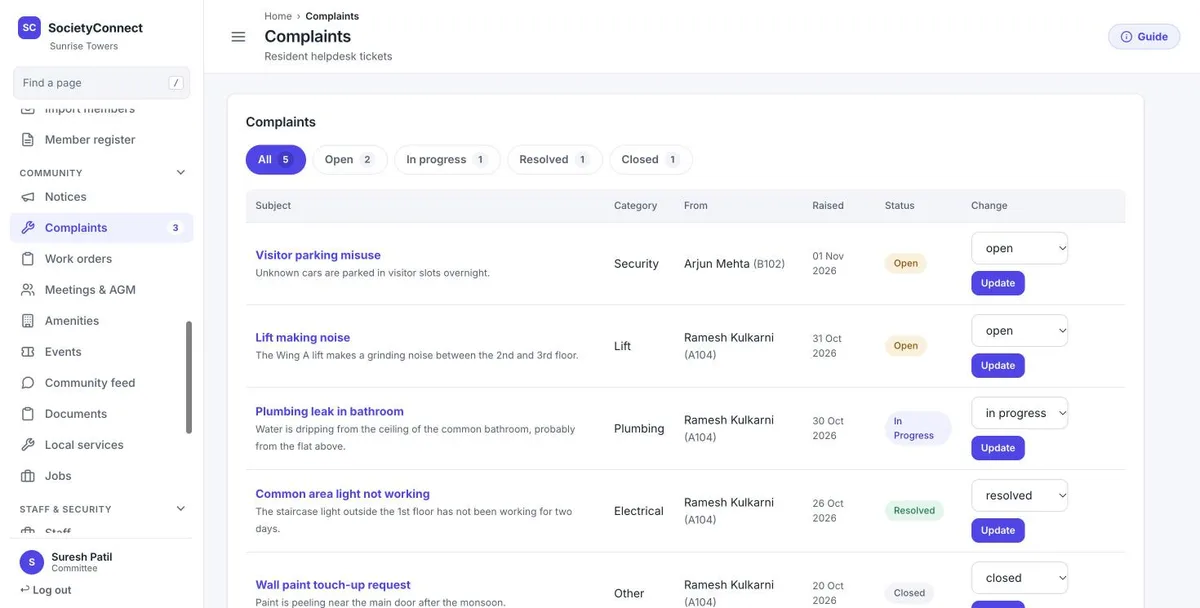
The complaints page lists every ticket with its subject, the first line of detail, the category, the resident and flat, the date raised and the current status. Filters along the top count how many are open, in progress, resolved and closed, so the committee can see the backlog before the meeting starts.
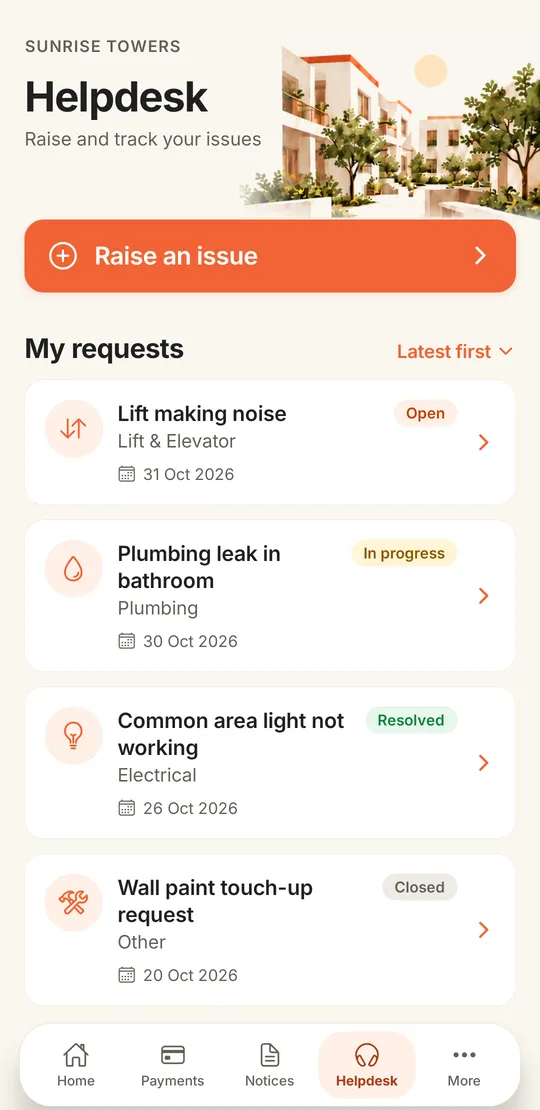
The Helpdesk tab sits in the bottom bar of the resident app, next to Payments and Notices.
Attach pictures or a short clip when you raise the issue. The committee sees exactly what you see.
Plumbing, electrical, security, housekeeping, lift, parking or other, each with its own icon in the list.
A push notification and an entry in the bell when the status changes or the committee replies.
Every complaint you raised, with its date and a coloured status pill: open, in progress, resolved or closed.
Reply inside the complaint. The whole conversation stays attached to the issue for the next committee to read.
Give one to five stars once it is resolved. If the problem came back, reply and the complaint opens again.
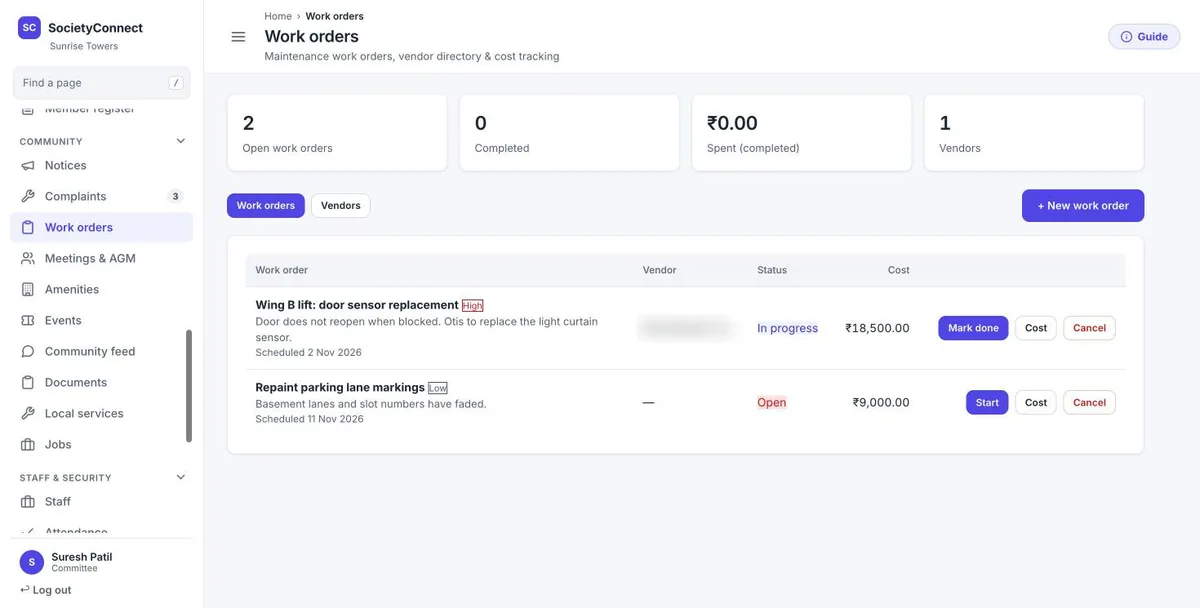
Some complaints need an outside vendor. The committee creates a work order with a title, description, priority, scheduled date and the vendor from the society’s own vendor list. The work order page shows open jobs, completed jobs, the total spent on completed work and the number of vendors.
Over a year this becomes the society’s repair history: what was fixed, by whom, and what it cost. For paying the vendor through the books, see vendor and purchase management.
| Paper register | WhatsApp group | SocietyConnect | |
|---|---|---|---|
| Photo of the problem | No | Yes, lost in the chat | Attached to the complaint |
| Current status | Whatever the last line says | Nobody knows | Open, in progress, resolved or closed |
| Resident told of progress | Only if they ask | Only if someone replies | Push notification on every change |
| Reopen a bad fix | Write a new entry | Post again and hope | One reply reopens it |
| Vendor job and cost | Separate diary | Not recorded | Work order with vendor, status and cost |
These are on our list. Plan around them for now.
We load your flats, set up committee logins and show your residents where the Helpdesk tab is, free for 90 days.
It is a single place where residents raise maintenance and other issues and the committee tracks each one to the end. In SocietyConnect every complaint has a category, photos, a status, a reply thread and a history of changes, and the resident sees the same record on the phone.
Yes. Residents can attach photos or a short video when they raise the issue, and the committee sees them inside the complaint on the web dashboard.
The resident replies on the complaint. That reopens it, clears the old resolution time and records in the history that it was reopened by the resident.
Not yet. There is no auto-assignment by department or roster and no SLA timer or escalation today. The committee assigns the work and the dashboard counts open complaints so they stay visible.
Yes. The committee creates a work order with the vendor, priority, date and cost, and tracks it from open to done. The committee then marks the complaint resolved, and the resident is notified.
No. A resident sees only the complaints they raised. The committee sees every complaint in the society.
It is free for 90 days with every module on, and our team sets it up. After that we give a written quote based on your flats and the modules you keep. Nothing is charged automatically.
Every module on for 90 days, complaints and helpdesk included. Our team loads your flats and dues, trains your guards, and nothing is charged automatically.
Free for 90 days with every module on. Our team loads your flats and dues and trains your guards.
We will call you within one business day to connect your society.
Or message us on WhatsApp