My bookings tab
Residents see their upcoming and past bookings with status: booked, pending, cancelled or declined.
Residents see free slots for the clubhouse, hall or badminton court and book from the phone. The app checks capacity, sends approval requests to the committee and tells the resident the answer. Society events get RSVPs with a seat count. Part of SocietyConnect, free for 90 days.
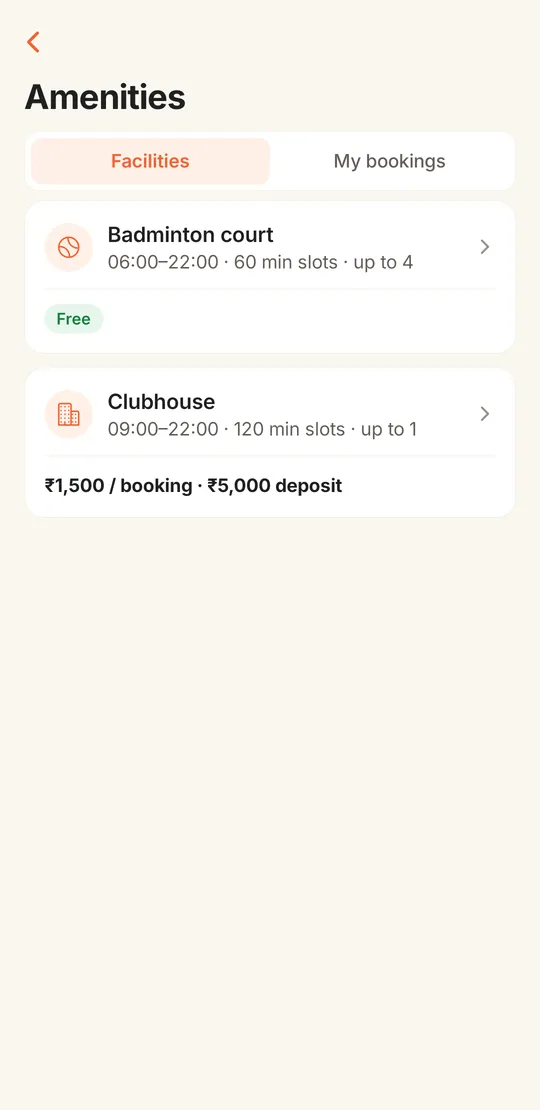
Two families in B-wing both think they have the clubhouse on Saturday evening for a birthday. Both spoke to the manager. Neither has anything in writing.
Amenity booking in many societies runs on a register at the office and the manager’s memory. Residents phone to ask if the hall is free, the manager checks a page with crossings-out, and the committee hears about it only when two cakes arrive at the same time. Badminton courts and gyms have their own unwritten rules about who plays when.
In SocietyConnect each facility has its hours, slot length, capacity, charge, deposit and rules written down once. Residents see which slots are free on their phone and book them. If the facility needs approval, the request waits for the committee and the resident is told when it is approved or declined. Nobody can book a slot that is already full.
| Setting | What the committee decides | What the app enforces |
|---|---|---|
| Hours | Opening and closing time, for example 6 am to 10 pm | Only slots inside those hours are offered; past slots today cannot be booked |
| Slot length | How long one booking lasts, such as 60 or 120 minutes | The day is split into slots of that length |
| Capacity | 1 for a party hall, or a number such as 4 for a court or gym | Capacity 1 means exclusive; capacity 4 means up to four flats in the same slot. One flat cannot hold two places in one slot |
| Approval | Whether the committee must approve each booking | Bookings wait as pending; approval re-checks capacity first, and a request whose date has passed cannot be approved |
| Charge | A fee per booking, or free | Shown on the facility and the booking, with a Pay button that opens the society’s UPI QR |
| Deposit | A refundable deposit amount | Shown to the resident before booking |
| Rules and terms | House rules in plain words | Shown on the booking screen, such as no loud music after 10 pm |
Capacity is checked under a lock, so two residents tapping the same slot at the same moment cannot both get it.
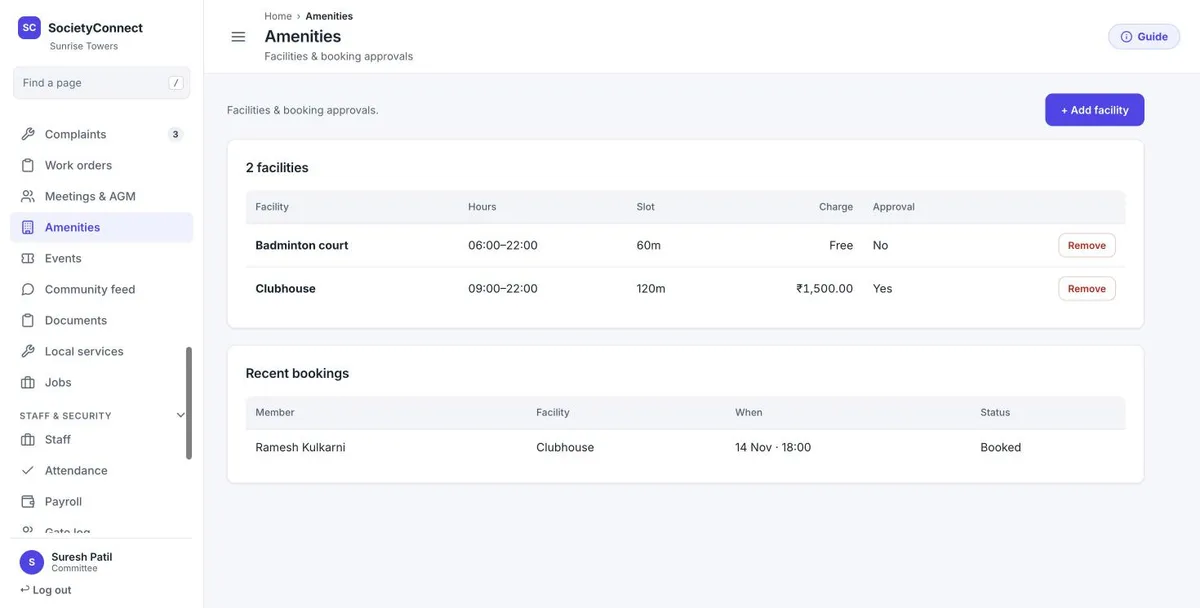
The amenities page lists every facility with its hours, slot length, charge and whether it needs approval. Under it, recent bookings show the member, the facility, the date and time and the status. The committee adds a facility in a short form and approves or declines pending requests here or in the app.
The resident opens Amenities and sees each facility with its hours, slot length, capacity and charge or Free.
Free slots show how many places are left. Full slots and slots already past cannot be picked.
If approval is on, the committee gets a "Booking to approve" alert. Approval checks capacity again before it goes through.
A push notification says the booking was approved or declined. If there is a charge, a Pay button opens the society’s UPI QR.
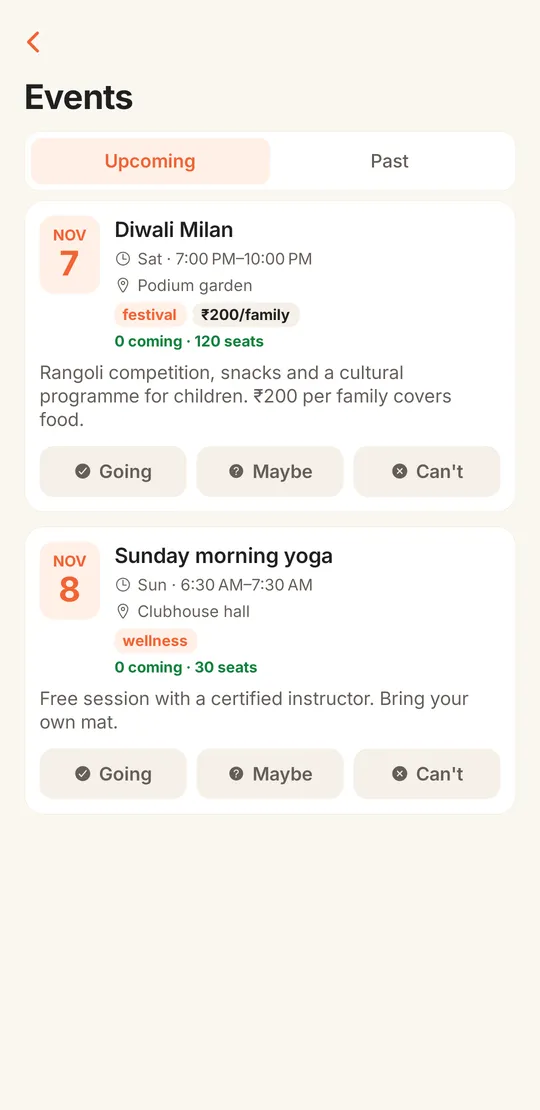
The committee posts an event with a title, description, venue, category, start and end time, a cover photo, a per-family fee if there is one, and a seat limit. Members get a push notification and answer Going, Maybe or Can’t, with the number of guests they are bringing.
Seats count heads, so a family of four takes four seats. When the event is full the app refuses more Going answers, and two people answering at the same moment cannot overfill it. The committee sees who responded, which makes ordering food for the Diwali Milan a lot less of a guess.
Residents see their upcoming and past bookings with status: booked, pending, cancelled or declined.
Slots and the "already past" check use the society’s local time.
The committee is told of each request; the resident is told of each decision and of any cancellation.
Each facility can carry a photo, a description and its house rules.
A capacity of one locks the hall for one flat; a higher capacity lets several flats share the court.
A resident cancels their own booking while it is still pending or booked, and the slot frees up.
Know these before you move the clubhouse register.
Tell us your facilities and rules. We set them up, train the manager and show residents how to book, free for 90 days.
Each facility is set up once with its hours, slot length, capacity, charge and rules. Residents pick a date and a free slot on their phone, and the app either confirms it or sends it to the committee for approval, then tells the resident the result.
Yes, if the committee sets a capacity above one. A capacity of four lets up to four flats book the same slot. A capacity of one makes the facility exclusive, which suits a party hall.
Yes. Turn on approval for that facility and every booking waits as pending until the committee approves or declines it. Approval checks capacity again, and a request whose date has already passed cannot be approved.
The booking shows a Pay button that opens the society’s UPI QR with the amount. The payment is not posted to the ledger automatically; the treasurer records it as amenity income.
Not yet. There is no defaulter block, cooldown or per-flat limit on bookings today. The committee can use approval to check bookings by hand.
Yes. The committee posts events with a venue, time, fee note and seat limit. Members answer Going, Maybe or Can’t with a guest count, and the seat limit is enforced.
It is free for 90 days with every module on. After that the society gets a written quote. Nothing is charged automatically.
Every module on for 90 days, amenity booking included. Our team loads your flats and dues, trains your guards, and nothing is charged automatically.
Free for 90 days with every module on. Our team loads your flats and dues and trains your guards.
We will call you within one business day to connect your society.
Or message us on WhatsApp