Collect at the office
Record cash, cheque, bank transfer or UPI against a flat. The amount clears the oldest dues first and prints a receipt.
Members tap Pay via UPI on their bill, pay from any UPI app straight into the society’s account, and report the UTR. The committee confirms it against the bank and the bill, ledger and receipt update together. Part of SocietyConnect, free for 90 days.
This is the path for a UPI payment made from the app. Cash and cheques skip the first four steps because the office records them directly.
On the bill card, the member taps Pay via UPI. The phone offers the UPI apps installed on it.
GPay, PhonePe, Paytm or the bank’s own app opens with the society’s UPI ID, the amount still due and a note with the bill and flat.
Back in SocietyConnect, the member enters the UTR or reference and can attach a screenshot as proof.
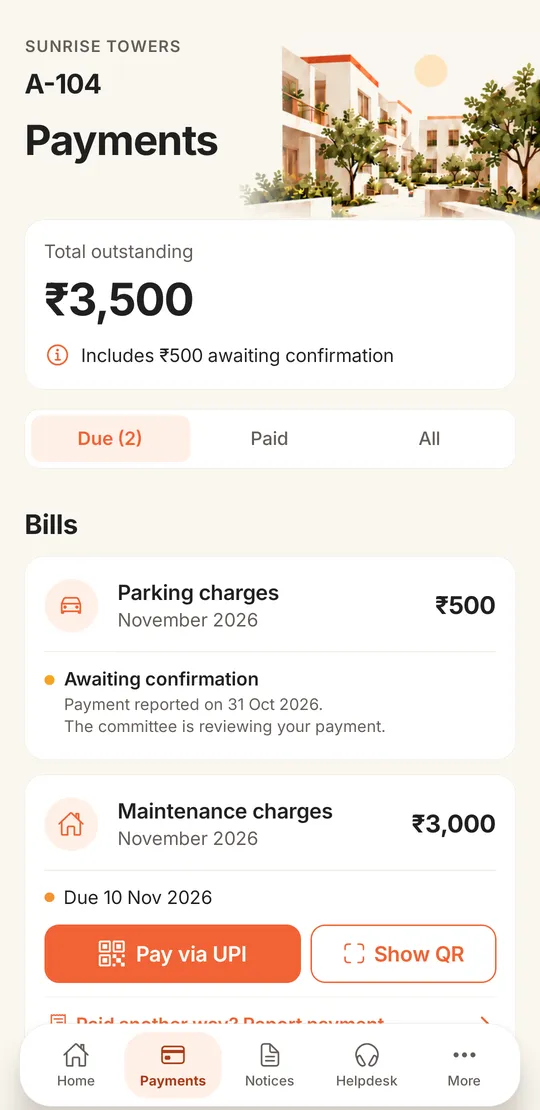
The bill card says when the payment was reported. The flat’s total outstanding notes the amount awaiting confirmation.
The payment appears under Payments to confirm on the Bills page and on the dashboard. A committee member checks the bank and taps Confirm or Reject.
On confirm, the amount is applied to the bill, anything extra is kept as the flat’s advance, the receipt posts to the books and the member gets a Payment confirmed notification.
By the 10th of every month, the treasurer’s WhatsApp is full of UPI screenshots, and half of them do not say which flat paid.
Giving members the society’s UPI ID does make paying easy. The trouble starts afterwards. Money arrives in the bank with a name that belongs to someone’s son or a business account, the screenshot comes on a different day, and the treasurer spends evenings matching credits on the bank statement to flats on a printed list.
SocietyConnect keeps the convenience of UPI and adds the missing link to the bill. The payment starts from a specific bill, so the amount and the flat are already known. The member’s UTR comes in with it. The committee only has to check that the money arrived, and one tap updates the bill, the flat’s ledger and the society’s books. Our guide on how to collect society maintenance online covers the wider choices.
The Payments tab shows the flat’s total outstanding, then each bill with its month and due date. A bill the member has already reported carries an Awaiting confirmation line, so there is no second payment by mistake.
Record cash, cheque, bank transfer or UPI against a flat. The amount clears the oldest dues first and prints a receipt.
Paste or upload one row per payment with flat, amount, method, reference and date. Check the preview, then record them all. Flat labels like A-101, A101 or a 101 all match.
Park a bank credit you cannot place yet. SocietyConnect suggests flats whose dues match the amount and member reports with the same reference.
A member can pay part of a bill. Extra money is kept as the flat’s advance and used on the next bill automatically.
Mark a cheque as bounced and the receipt is reversed in the books, with the bounce charge raised on that flat.
Choose which of the society’s bank accounts a payment went into, so bank reconciliation matches per account.
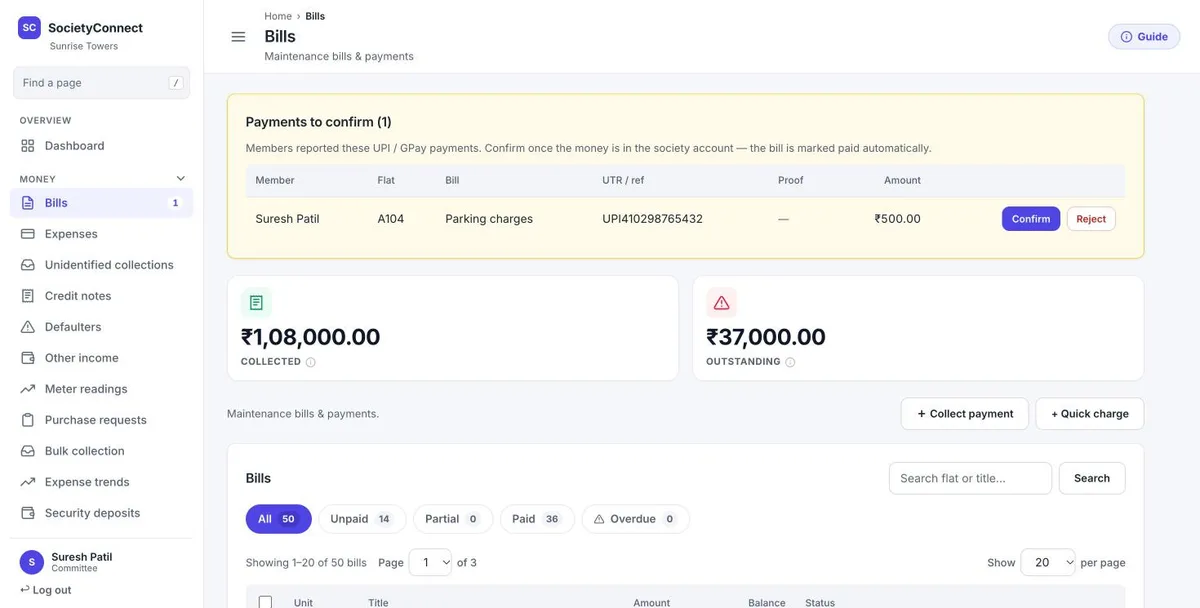
Every reported UPI payment shows the member, the flat, the bill, the UTR, any proof attached and the amount. The committee member opens the bank statement, finds the credit and taps Confirm. If the money is not there, Reject sends the member a notice to check and report again.
Below the box, the page shows how much has been collected and how much is still outstanding, with Collect payment and Quick charge buttons for the office.
| How the member pays | Who records it | When it posts to the books |
|---|---|---|
| UPI from the app | Member reports the UTR, committee confirms | When the committee confirms |
| UPI by scanning the QR | Member reports the UTR, committee confirms | When the committee confirms |
| Cash at the office | Office records it with Collect payment | Straight away, with a receipt |
| Cheque | Office records it with the cheque details | Straight away; reversed if it bounces |
| NEFT or IMPS | Member reports it, or the office records it singly or in bulk | When confirmed or recorded |
| A credit nobody can place | Office parks it under unidentified collections | When it is matched to a flat |
Know these before you announce online payments to members.
We add your society’s UPI ID, load your flats and dues, and show the committee how to confirm payments, free for 90 days.
They open the Payments tab, tap Pay via UPI on the bill and pay from any UPI app. The society’s UPI ID and the amount are filled in. They then report the UTR, and the committee confirms it once the money shows in the bank.
No. The UPI payment goes from the member’s app straight to the society’s own UPI ID and bank account. SocietyConnect records the bill, the report and the confirmation.
SocietyConnect adds no charge to a UPI payment made to the society’s UPI ID. Your bank’s own terms for the society’s account still apply, so check them with your bank.
Not in the app yet. The payment gateway connection is built on the server but not switched on in the app. Today members pay by UPI, and the office records cash, cheques and bank transfers.
They can tap Paid another way? Report payment on the bill and enter the reference. The office can also record it directly, or upload many payments at once from a spreadsheet.
The extra is kept as the flat’s advance and applied to the next bill automatically, so the member only sees what is still due.
Every SocietyConnect module is free for 90 days, with no card needed and nothing charged automatically. After that we give a written quote based on your flats and modules.
Every module on for 90 days, online maintenance payments included. Our team loads your flats and dues, trains your guards, and nothing is charged automatically.
Free for 90 days with every module on. Our team loads your flats and dues and trains your guards.
We will call you within one business day to connect your society.
Or message us on WhatsApp