Notices with push
Every resident gets a push and a bell entry when a notice is posted.
Post a notice and it reaches every resident’s phone with a push. Mark it urgent, pin it to the top, ask residents to acknowledge it, and see who has read it. Bye-laws, contacts and a community feed sit in the same app. Part of SocietyConnect, free for 90 days.
The water tank cleaning notice went up on the lift door on Monday. On Thursday morning, three flats on the seventh floor were surprised the taps were dry.
A paper notice reaches whoever happens to look at the lift door. A WhatsApp message reaches whoever scrolls back far enough, if they are in the group at all; tenants and senior members often are not. When something goes wrong, the committee has no way to show that residents were told.
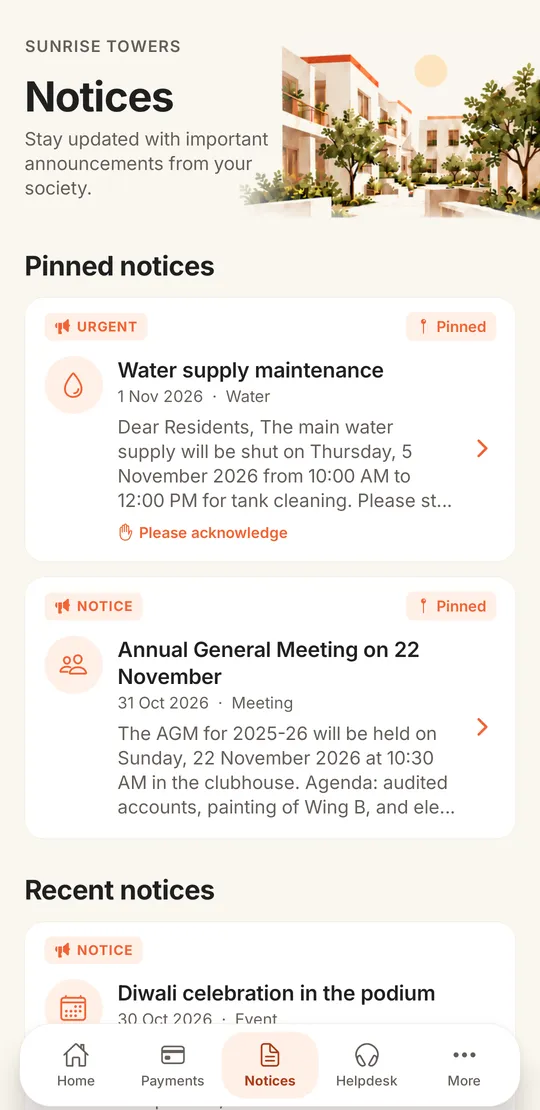
In SocietyConnect a notice goes to every resident’s phone as a push notification and stays on the Notices tab until it expires. Urgent notices get a louder alert and a red badge. If the committee asks for acknowledgement, each resident taps to confirm, and the committee sees who has read the notice and who has acknowledged it.
Each one has a job, so the WhatsApp group can go back to being a place for festival wishes.
Every resident gets a push and a bell entry when a notice is posted.
Urgent notices get a louder alert and red badge. Pinned notices stay at the top.
Ask residents to confirm they have read it, and see the count and the names.
A notice disappears from residents’ lists after its expiry date, so old news does not pile up.
Bye-laws, AGM minutes and NOCs in one place, with committee-only documents kept private.
Society office, electrician, ambulance and utility numbers, one tap to call.
Residents post updates with photos, like and comment. The committee can pin or remove posts.
Society events with RSVP, and polls for quick decisions, from the same app.
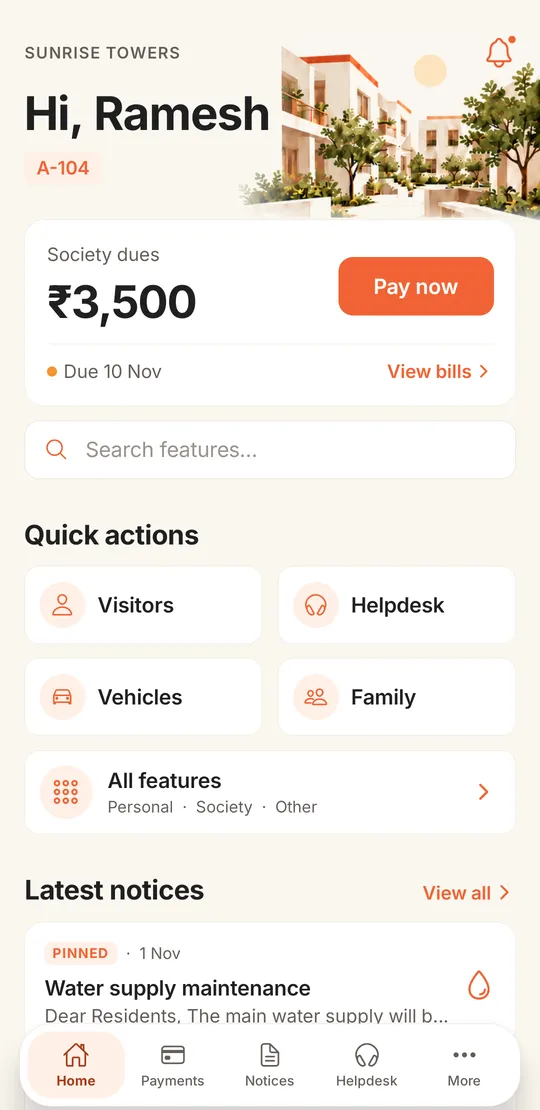
Residents do not have to go looking. The home screen shows the latest notices with pinned ones marked, right below the society dues card. The Notices tab in the bottom bar lists pinned notices first, then recent ones, each with its category, date and a short preview.
Title, body and category, with one or more attachments such as a circular or a photo.
Mark it urgent, pin it to the top, set an expiry date, and ask for acknowledgement if it matters.
Every resident and committee member gets a push notification and a bell entry.
The committee sees how many have read it and who has acknowledged, by name.
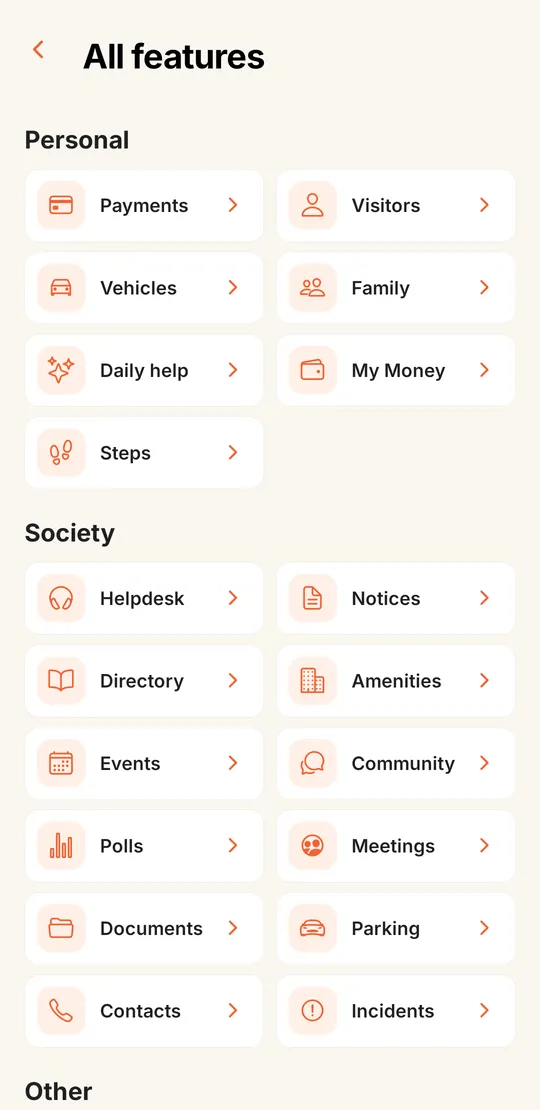
The All features screen groups everything a resident might need. Under Society sit Notices, Documents and Contacts next to Helpdesk, Amenities, Events, Polls and Meetings. Community opens the feed, where residents post updates and photos, like and comment, sell things to neighbours and run quick polls.
The committee can pin a feed post or remove one that breaks the society’s rules. For buying and selling, local shops and the jobs board, see community and marketplace.
| Paper on the lift door | WhatsApp group | SocietyConnect | |
|---|---|---|---|
| Reaches every flat | Only those who look | Only those in the group | Push to every resident with the app |
| Shows who read it | No | Blue ticks, if anyone checks | Read list and acknowledgement count |
| Urgent stands out | Bigger font | Lost among other messages | Louder alert and red badge |
| Old notices | Pile up or get torn | Buried in the chat | Expire on the date you set |
| Bye-laws and minutes | In the office cupboard | Forwarded PDFs | Documents library with access control |
So you can plan your circulars around them.
We add your residents, upload your bye-laws and contacts, and show the committee how to post the first notice, free for 90 days.
It sends the committee’s notices to every resident’s phone and keeps them in one list. In SocietyConnect notices can be urgent or pinned, carry attachments, expire on a date and ask residents to acknowledge them.
Yes. The committee sees how many residents have read each notice and, where acknowledgement was asked for, who has acknowledged it by name.
Not yet. Notices go out as push notifications and appear in the app. Residents without the app will not receive them, so keep a printed copy for the lift door for now.
Yes. Each document is set to all members or committee only. Files are opened through a signed link that expires after 15 minutes, so a forwarded link stops working.
Residents can post, like and comment in the community feed. There is no private one-to-one chat yet.
It is free for 90 days with every module on, and our team sets it up. After that the society gets a written quote. Nothing is charged automatically.
Every module on for 90 days, notices and communication included. Our team loads your flats and dues, trains your guards, and nothing is charged automatically.
Free for 90 days with every module on. Our team loads your flats and dues and trains your guards.
We will call you within one business day to connect your society.
Or message us on WhatsApp