Buy and sell
Sale posts in the community feed with a title, price, condition and photos. Interested buyers comment on the post, and the seller marks it sold.
Sell the old cycle to the family in C-wing, find the kirana that delivers to your pincode, post a flat for rent, and see who walked the most steps this week. A private spending diary sits alongside for your own use. Part of SocietyConnect, free for 90 days.
Priya in D-302 has a baby stroller her son outgrew. She posts it on the society WhatsApp group, where it sits between a water cut notice and forty good morning messages, and sells it on a classifieds site to a stranger instead.
A lot of what neighbours need from each other is small: a used cot, a reliable maid agency, the medical store that delivers after 9 pm, a tenant for the empty flat on the fifth floor. In most societies that all goes through one noisy WhatsApp group, and the useful posts are gone by lunch.
SocietyConnect gives each of these its own place inside the app residents already use for dues and notices. Buy and sell posts carry a price and photos. Local shops list their products for your pincode. Jobs and flat listings stay up until the poster closes them. The step challenge gives the morning walkers something to compete over.
Sale posts in the community feed with a title, price, condition and photos. Interested buyers comment on the post, and the seller marks it sold.
Approved shops whose pincode matches your society, with products, offers, delivery details, ratings and an enquiry button.
Plumbers, electricians, tutors and others added by residents, rated from one to five stars with comments.
Post that you are looking for work or offering it. Posts stay open until the poster or committee closes them.
Listings with price, deposit, BHK, area, furnishing, floor, photos and a contact, visible to members and the guard.
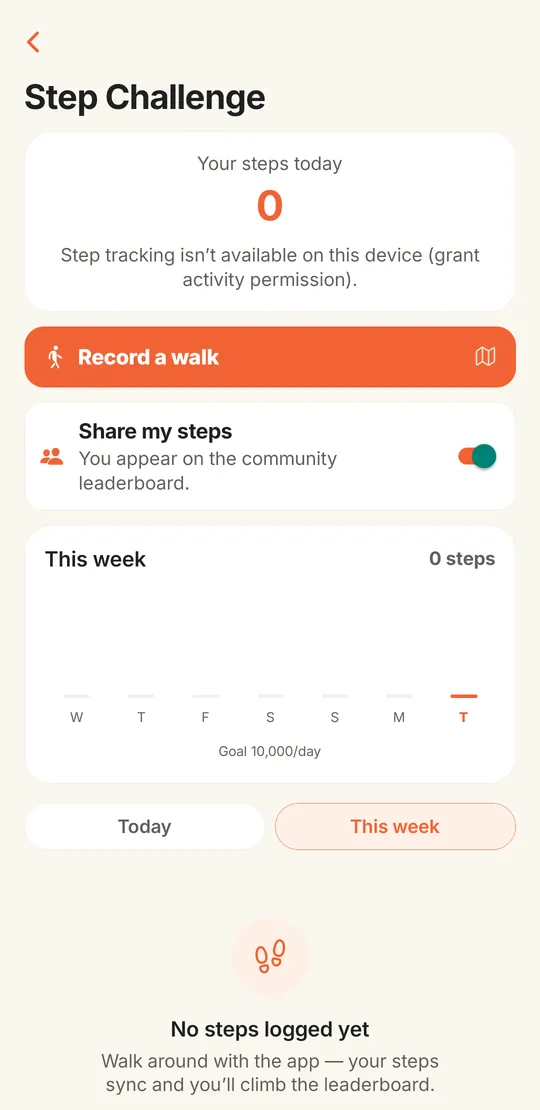
Steps from the phone, recorded walks, and a leaderboard for today, this week or the committee’s challenge.
The shopkeeper signs up in the shop app with the shop name, address and pincode.
Products with price, unit, photo and in-stock status, plus any offer, delivery fee, minimum order, free delivery threshold and delivery time.
The draft goes to the Infoways platform team, who approve it or send it back with a reason.
Once approved, the shop shows to every SocietyConnect society with the same pincode.
Residents call, open WhatsApp or send an enquiry about a product, and can leave a rating and review. The shopkeeper sees enquiries and replies to reviews.
The phone’s step counter feeds the day’s total, which syncs to the society leaderboard while the screen is open. Record a walk traces the route by GPS and adds the distance and steps to your day. The committee can start a challenge with a title and dates, and the leaderboard switches between today, this week and the challenge.
Residents who would rather not appear on the leaderboard switch off Share my steps. The counter needs the phone’s activity permission; without it the screen says so plainly.
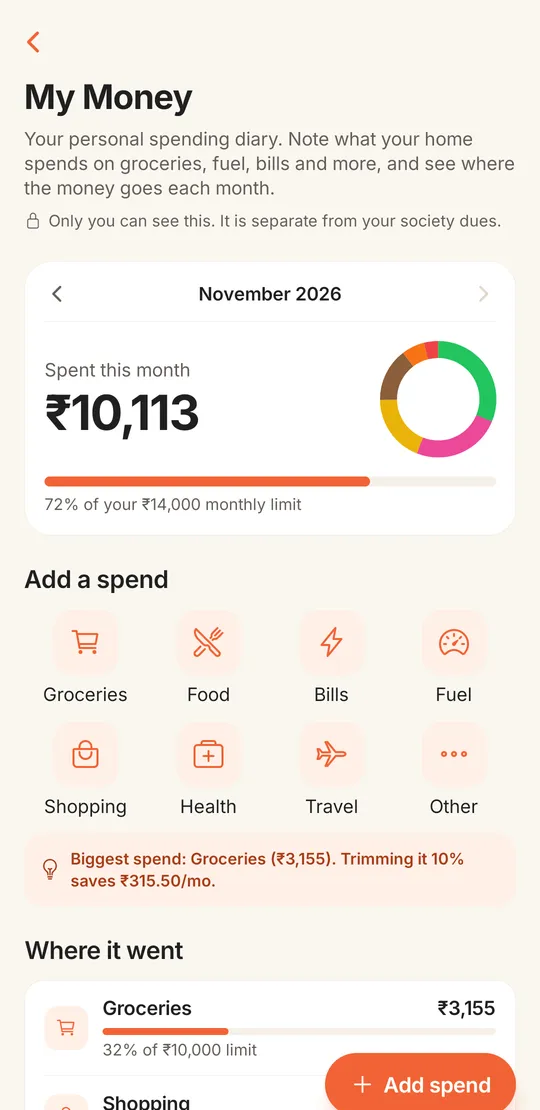
My Money is for the household, not the society. Residents note what they spend on groceries, food, bills, fuel, shopping, health and travel, set a monthly limit and category budgets, and watch where the money went. A short tip points out the biggest spend of the month.
The screen says it in plain words: only you can see this, and it is separate from your society dues. Nothing here reaches the committee or the society’s books. For paying the society, see maintenance payments.
| WhatsApp group | SocietyConnect | |
|---|---|---|
| Selling something | Post scrolls away in an hour | Sale post with price and photos, marked sold when done |
| Finding a local shop | Ask and wait for replies | Shops for your pincode with products and ratings |
| Flat for rent | Forwarded photos | Listing with price, deposit, BHK, area and contact |
| Hiring help | Lost in the chat | Jobs board that stays until closed |
| Moderation | Group admin deletes by hand | Committee pins or removes posts and listings |
Worth knowing before you announce it to residents.
We set up your society, invite the shops you already use if they want to join, and show residents around, free for 90 days.
It is the part of a society app where residents deal with each other and the neighbourhood: selling things, finding local shops and services, posting jobs and flats, and joining community activities. In SocietyConnect it sits alongside dues, notices and the helpdesk.
A resident creates a sale post in the community feed with a title, price, condition and photos. Interested neighbours comment on the post, and the seller marks it sold. There is no private chat yet.
Shops that a shopkeeper registers in the shop app and the Infoways platform team approves. A shop shows to societies with the same pincode.
Not yet. Residents can call the shop, open WhatsApp or send an enquiry about a product, and pay the shop directly.
No. My Money is private to the resident who enters it and is kept separate from society dues and the society’s accounts.
Yes. Switch off Share my steps and your steps stay on your phone’s screen without appearing on the community leaderboard.
It is free for 90 days with every module on. After that the society gets a written quote. Nothing is charged automatically.
Every module on for 90 days, community and marketplace included. Our team loads your flats and dues, trains your guards, and nothing is charged automatically.
Free for 90 days with every module on. Our team loads your flats and dues and trains your guards.
We will call you within one business day to connect your society.
Or message us on WhatsApp