Wings and flats
Create a wing with its floors and flats per floor, preview the flat numbers, then generate them in one go. Wings can carry a sector name for townships. Commercial units such as shops sit alongside flats.
Wings and flats, owners and tenants, family members, pets, vehicles and parking slots, all under the right flat. Residents join with a society code and the committee approves. Part of SocietyConnect, free for 90 days.
A-302 was sold two years ago, B-105 is on its third tenant, and the member register still shows the builder’s list.
Every society has the same problem. The member register is a file in the office cupboard, the flat owner list is an Excel sheet on the treasurer’s laptop, and nobody knows which flats are let out until a tenant asks for a parking sticker. Bills go to people who moved away, and notices miss the people who live there.
In SocietyConnect each flat is the anchor. The owner, the tenant if there is one, family members, pets, vehicles and parking slots all sit under that flat. Residents ask to join with a code, the committee checks who already lives there and approves. When someone moves out, the committee stamps the date and their login stops working, while their bills and payments stay in the society’s records.
How a new resident gets into SocietyConnect without the secretary typing their details.
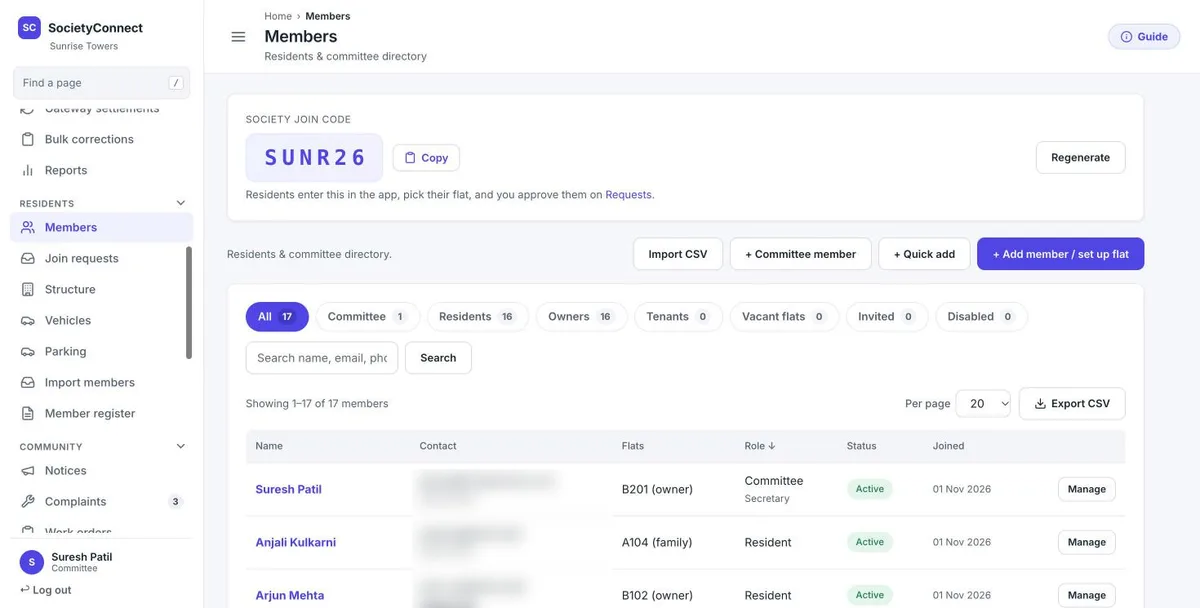
The Members page on the web dashboard shows a short society join code with a Copy button. The committee can regenerate it any time.
On the app’s sign-in screen, the resident enters the code and sees the society’s name, so they know they have the right one.
The app lists the wings and flats from the society’s structure. The resident picks theirs and enters name, email and phone.
Owner, tenant or family member. They set a password and send the request.
Join requests on the dashboard show who already lives in the requested flat, so a stranger claiming A-104 stands out.
Approval creates the account, links the flat and emails the resident. A rejection can carry a reason, also by email.
The Members page lists everyone with their flat, role and status. Tabs split the list into committee, residents, owners, tenants, vacant flats, invited and disabled accounts. Search by name, email or phone, and export the list as a CSV.
Create a wing with its floors and flats per floor, preview the flat numbers, then generate them in one go. Wings can carry a sector name for townships. Commercial units such as shops sit alongside flats.
Each flat has an owner. If it is let out, the tenant becomes the primary resident. Move-in and move-out dates are kept for each person.
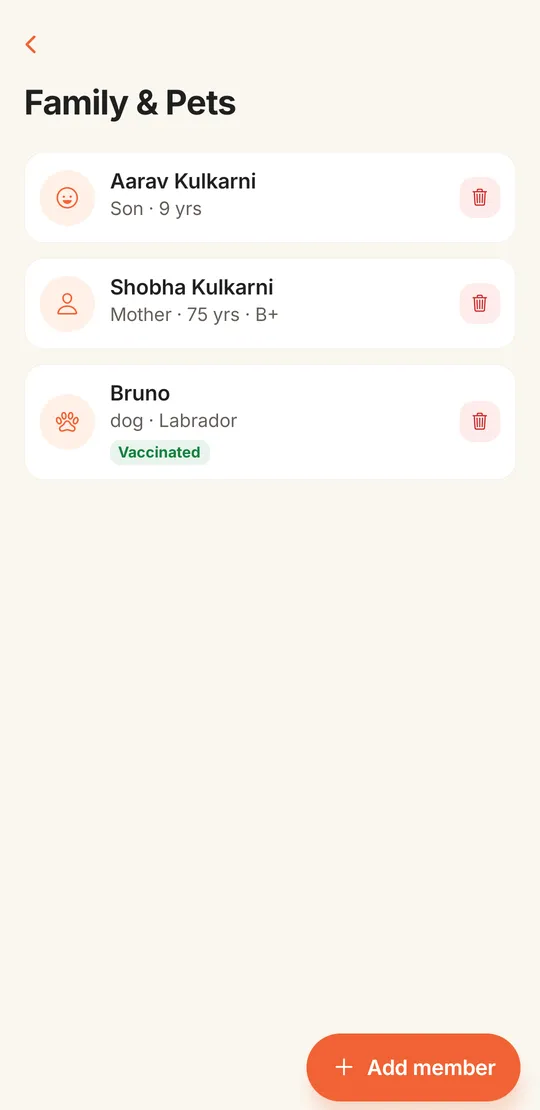
Children, senior citizens and pets, with age, blood group, emergency contact, breed and vaccination status. Family members do not need a login.
Number, type, model, colour, fuel, sticker number, and insurance and PUC expiry dates. The app shows when a PUC or policy is due or has lapsed.
The committee creates car, bike and visitor slots by zone and allots them to flats. Residents cannot change their own slot.
Each flat page has tabs for overview, account, people, vehicles, complaints and documents such as demand letters, NOCs and receipts.
Residents add their children, parents and pets from the app. For a senior citizen they can note the blood group, a medical note, an emergency contact and whether the person lives alone. For a pet they record species, breed and vaccination.
Household details are private to the flat and the committee. Guards cannot see them in the gate app. Residents also add their own vehicles, and book a visitor parking slot for a guest on a date when the society has visitor slots.
| Owner | Tenant | Family member with a login | |
|---|---|---|---|
| Join with the society code | Yes | Yes | Yes |
| Approve visitors to the flat | Yes | Yes | Yes |
| See and pay the flat’s bills | Yes | Yes, while living there | Yes, while living there |
| Add family, pets and vehicles | Yes | Yes | Yes |
| Shown in the resident directory | Yes, can hide phone number | Yes, can hide phone number | Yes, can hide phone number |
| Listed in Form I and Form J | Yes, with shares and nominee | No | No |
A resident whose move-out date has passed no longer sees that flat’s bills. Billing rules for non-occupancy charges are on the maintenance billing page.
Know these before you move your register over.
Share your flat list and member register in any format. Our team sets up wings, flats, owners and tenants, then hands you the join code, free for 90 days.
It keeps the society’s register of flats and people in one place: owners, tenants, family members, vehicles and parking. In SocietyConnect the committee manages it on the web dashboard and residents keep their own household details up to date in the app.
The committee shares the society join code. The resident taps Join your society in the app, enters the code, picks their wing and flat, says whether they are the owner, a tenant or family, and sends the request. The committee sees who already lives in that flat and approves or rejects it.
Yes. The import page takes a CSV with wing, flat, name, email, phone, relation, unit type, BHK, carpet area, share certificate and nominee. It shows a preview first and skips rows with errors. Our team does this with you during setup.
A tenant is linked to the flat with the relation tenant and becomes the primary resident while the owner stays on record. When the tenant moves out, the committee sets the move-out date and their access to the flat ends.
Yes. It prints Form I (Register of Members) and Form J (List of Members) with shareholding and nominee details, from the flat and member records.
Yes. A resident can hide their number from the directory. The committee and the resident still see it.
It is free for 90 days with every module on. After that we give a written quote based on your flats and the modules you keep.
Every module on for 90 days, members, flats and tenants included. Our team loads your flats and dues, trains your guards, and nothing is charged automatically.
Free for 90 days with every module on. Our team loads your flats and dues and trains your guards.
We will call you within one business day to connect your society.
Or message us on WhatsApp