Society AGM e-voting that counts one vote per flat and keeps the minutes with the meeting
Schedule the AGM, EGM or committee meeting with its agenda and venue, collect RSVPs, then open voting on each resolution. Members vote from their phones, the tally updates as votes come in, and the minutes are saved with the meeting. Part of SocietyConnect, free for 90 days.
- AGM, EGM and committee
- RSVP before the day
- One vote per flat
- Minutes on record
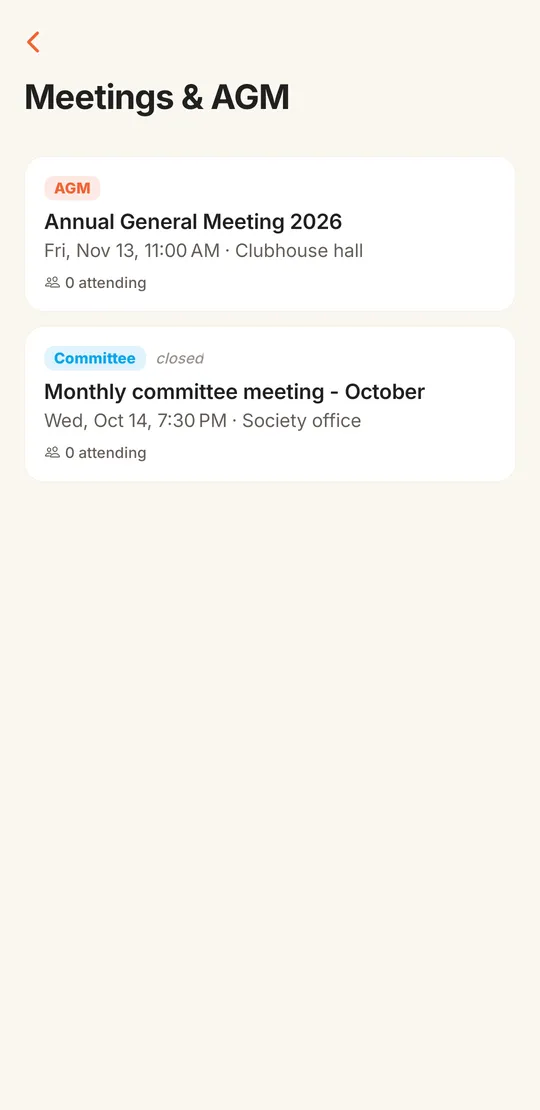
- Meetings
- AGM, EGM and committee meetings with agenda, venue, date and quorum percentage.
- Voting
- For, against or abstain on each resolution, one vote per flat.
- Also included
- Online polls with single or multiple choice, anonymous option and a closing date.
- Cost to try
- Free for 90 days with every SocietyConnect module on.
At last year’s AGM the vote on painting Wing B was a show of hands in a hot clubhouse. Half the owners were at work, two were abroad, and the secretary counted the hands twice and got two answers.
General body meetings decide the expensive things: repairs, painting, sinking fund use, the budget. Yet many societies still announce them on a printed notice, guess the turnout, count hands in a crowded room and write the minutes weeks later from memory. Members who could not attend have no say and no record of what was decided.
SocietyConnect puts the meeting and its resolutions in the app. Members see the agenda and say if they will attend. When the committee opens voting on a resolution, any member of a flat can vote for the flat from wherever they are, and the count is visible as it builds. The committee then records the result and the minutes against the same meeting.
How an AGM runs in SocietyConnect, step by step
- 01
Schedule the meeting
The committee picks AGM, EGM or committee meeting and adds the title, agenda, venue, date and time and the quorum percentage from your bye-laws. Schedule it from the committee app and every member gets a push notification.
- 02
Post the notice
Pin a notice with the agenda and ask members to acknowledge it, so the committee can see who has read it.
- 03
Collect RSVPs
Members answer Attending, Maybe or Can’t. Only members can RSVP; guard and shop accounts cannot.
- 04
Add the resolutions
The committee adds each resolution with a title and description, in the order they will be taken up.
- 05
Open voting
Voting opens one resolution at a time. Members vote For, Against or Abstain from the app, and the tally updates as votes arrive.
- 06
Close and record the result
The committee closes voting and marks the resolution Passed or Not passed. Members see the outcome on the meeting screen.
- 07
Save the minutes
The committee types the minutes into the meeting. Members can read them in the app, and the meeting is marked closed.
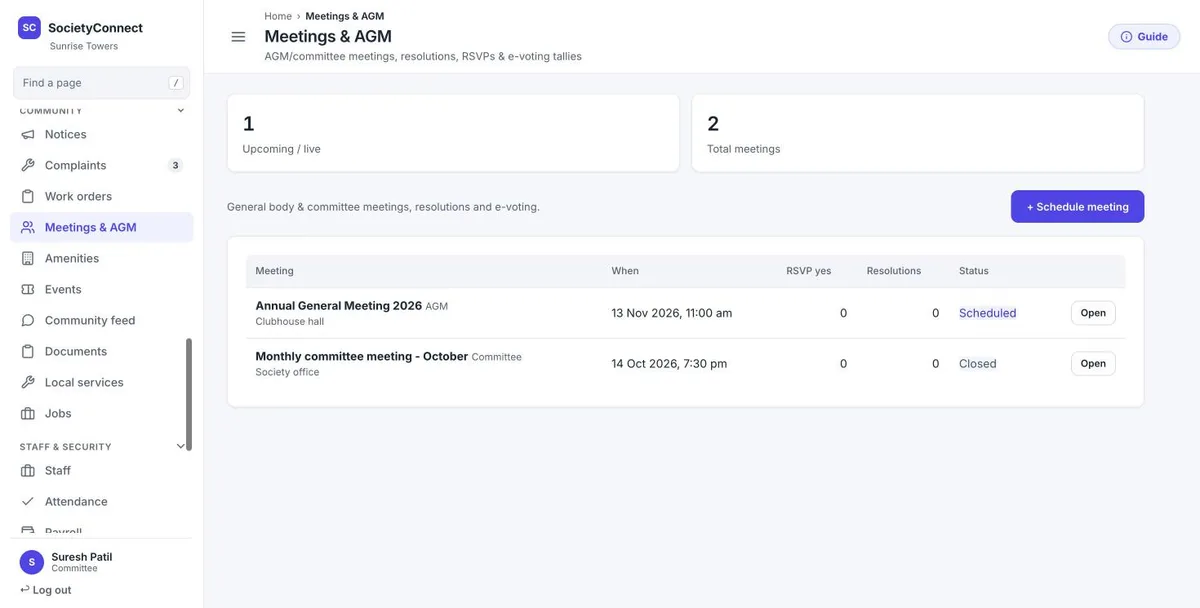
Every meeting, its RSVPs and its resolutions on one page
The Meetings and AGM page on the web dashboard shows how many meetings are upcoming or live, and lists each one with its type, date, venue, RSVP count, number of resolutions and status. Open a meeting to add resolutions, open or close voting and write the minutes.
- Schedule AGM, EGM or committee meetings
- Status moves from scheduled to live to closed
- Quorum percentage shown on the meeting
- Minutes saved against the meeting
Members vote, the committee runs the meeting
Member
- Reads the agenda and RSVPs
- Votes For, Against or Abstain for the flat
- Changes the flat’s vote while voting is still open
- Reads the result and the minutes afterwards
Committee
- Schedules the meeting with agenda and quorum
- Adds resolutions and opens voting on each one
- Closes voting and marks passed or not passed
- Writes and saves the minutes
Guard and shop accounts
- Cannot RSVP to general body meetings
- Cannot vote on resolutions
- Are kept out so they never count toward turnout
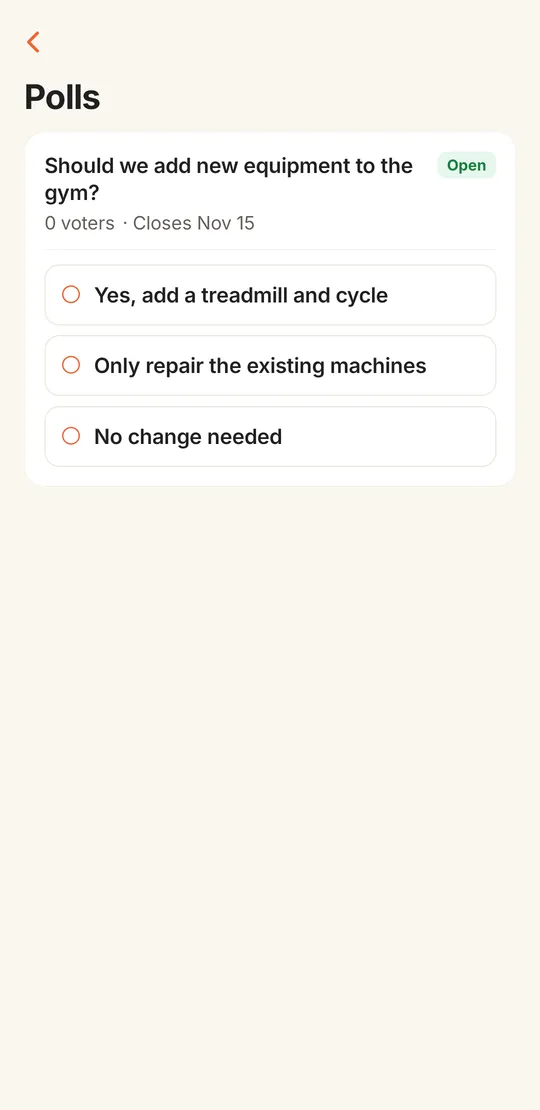
Quick polls for decisions that do not need a meeting
Not every question needs a general body. Should the gym get a treadmill? Which Sunday suits the society picnic? The committee posts a poll with options, picks single or multiple choice, sets a closing date, and can make it anonymous so nobody sees who chose what.
Polls are counted one per flat, the same way as resolutions. For a poll that is not anonymous, the committee can see which members picked each option. Committee elections can be run as a poll with one option per candidate, within the limits set out below.
- Single or multiple choice
- Anonymous option hides who voted for what
- Closing date, or close it by hand
- Counted one per flat
A hall vote next to SocietyConnect e-voting
| Show of hands at the AGM | SocietyConnect | |
|---|---|---|
| Who can vote | Only those in the room | Any member of the flat, from the app |
| One vote per flat | Hard to police in a crowd | Enforced; the flat’s latest choice counts |
| The count | Counted by eye, sometimes twice | For, against and abstain tallied as votes come in |
| Record of the result | In the minutes, if someone writes it | Passed or not passed saved on the resolution |
| Minutes | Typed weeks later | Saved against the meeting in the app |
What the system enforces so the count can be trusted
- One vote per flat: if two family members vote, the latest choice is the flat’s vote
- Only residents linked to a flat can vote on resolutions
- Votes are accepted only while the committee has voting open
- A member can change the flat’s vote until voting closes
- Guard and shopkeeper accounts cannot RSVP or vote
- Anonymous polls never show voter names, even to the committee
What it does not do yet
Read these with your bye-laws open.
- SocietyConnect e-voting is a tool for running your meeting. It is not a certified statutory election system. Committee elections and resolutions that the law or your bye-laws require to follow a set procedure may need a returning officer or the election authority. Confirm with your adviser before you rely on it for those.
- The quorum percentage is recorded on the meeting but not checked automatically against attendance. The committee confirms quorum.
- There is no proxy voting and no OTP check on each vote. Resolution votes are stored against the flat, so they are not a secret ballot.
- Minutes are saved as text in the app; there is no signed PDF of the minutes yet.
- Meetings scheduled from the web dashboard do not send a push notification yet. Schedule from the app or post a notice.
- There is no separate election module with nominations and scrutiny; elections can only be run as a poll.
- The apps are not on the Play Store or App Store yet. We share the Android apps with your society during setup, and iPhone users use the web portal.
Run your next AGM with the vote in the app
We set up your members and flats, show the committee how to open voting, and stay on call for the first meeting, free for 90 days.
AGM, meetings and e-voting: common questions
How does online voting for a housing society work in SocietyConnect?
The committee adds resolutions to a meeting and opens voting on each one. Members vote For, Against or Abstain from the app. Each flat has one vote, the latest choice from anyone in the flat counts, and the tally updates as votes come in.
Is SocietyConnect e-voting valid for a statutory AGM or committee election?
It is a tool for running the meeting and counting votes. It is not a certified statutory election system, and some elections and resolutions must follow procedures set by law or your bye-laws. Please confirm with your adviser before relying on it for those.
Can members who are not at the meeting vote?
Yes. Any member linked to a flat can vote from the app while the committee has voting open on that resolution, wherever they are.
Does it check quorum automatically?
No. The quorum percentage is shown on the meeting, but the committee confirms quorum. RSVP counts help the committee see expected turnout.
Can we run a secret ballot?
Polls can be made anonymous, which hides who voted for what even from the committee. Resolution votes are stored against the flat, so they are not a secret ballot.
Where are the minutes kept?
The committee types the minutes into the meeting in the app or on the web dashboard. Members can read them on the meeting screen. You can also upload a signed copy to the documents library.
Is this part of the free 90 days?
Yes. Every module, meetings and e-voting included, is free for 90 days and set up by our team. After that the society gets a written quote. Nothing is charged automatically.
Other parts of SocietyConnect
Connect your society now
Every module on for 90 days, agm, meetings and e-voting included. Our team loads your flats and dues, trains your guards, and nothing is charged automatically.
Connect your society now
Free for 90 days with every module on. Our team loads your flats and dues and trains your guards.
- No card needed
- Nothing charged automatically
- We call within one business day
Thank you!
We will call you within one business day to connect your society.
Or message us on WhatsApp