Guest pass with a code
The resident creates a pass and shares its code on WhatsApp or SMS from the phone’s share menu. The guard checks the code at the gate.
The guard logs each visitor with a photo, the flat gets Allow or Deny on the phone, and every entry goes into a gate register nobody can edit later. Part of SocietyConnect, free for 90 days.
A gate register is only useful if the guard fills it in, the flat can say no, and nobody can quietly tear out a page.
In most societies the visitor book at the gate is a formality. The guard writes a name when he has time, calls the flat on the intercom when it works, and lets the delivery rider in when the queue builds up. When something goes missing, the committee finds a register with half the entries blank and no way to tell who approved whom.
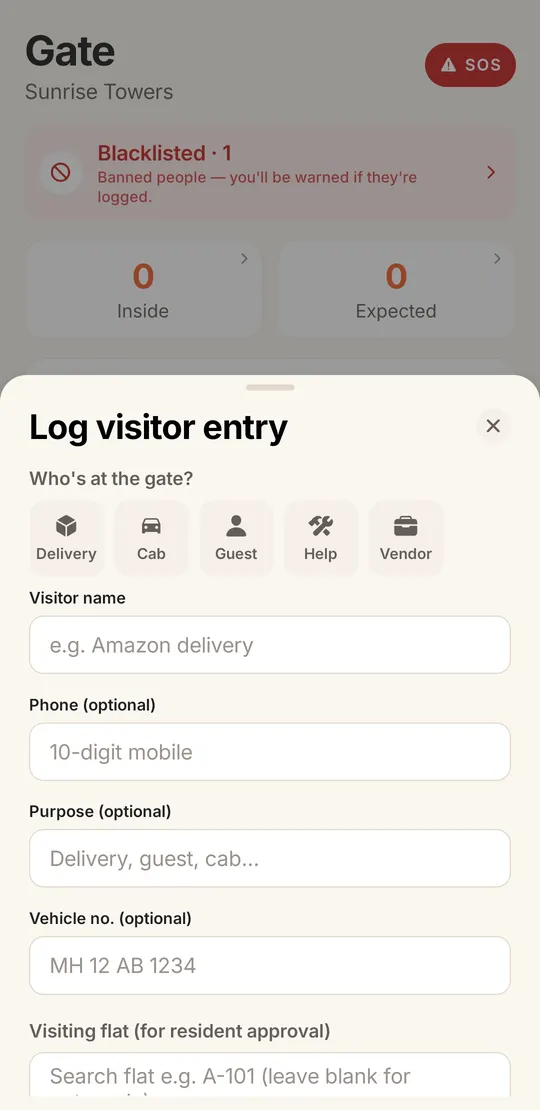
SocietyConnect moves that register onto the guard’s phone. Every visitor gets a photo, a category and a flat. The flat decides on its own phone. The entry keeps its in and out time and cannot be edited or deleted afterwards, so the register the committee reads on Monday is the one the guard filled in on Saturday night.
Quick tiles for delivery, cab, guest, help and vendor. For a delivery, company chips such as Swiggy, Zomato, Amazon, Flipkart, BigBasket, Blinkit and Zepto fill in the name and purpose.
Every resident of the flat gets a push notification with the visitor’s details and photo. One tap answers it.
The guard sees Allowed or Denied on the gate screen. A denied visitor is stopped and the refusal stays on record.
The guard marks the exit. In time, out time, photo and approval stay together, and the entry cannot be changed later.
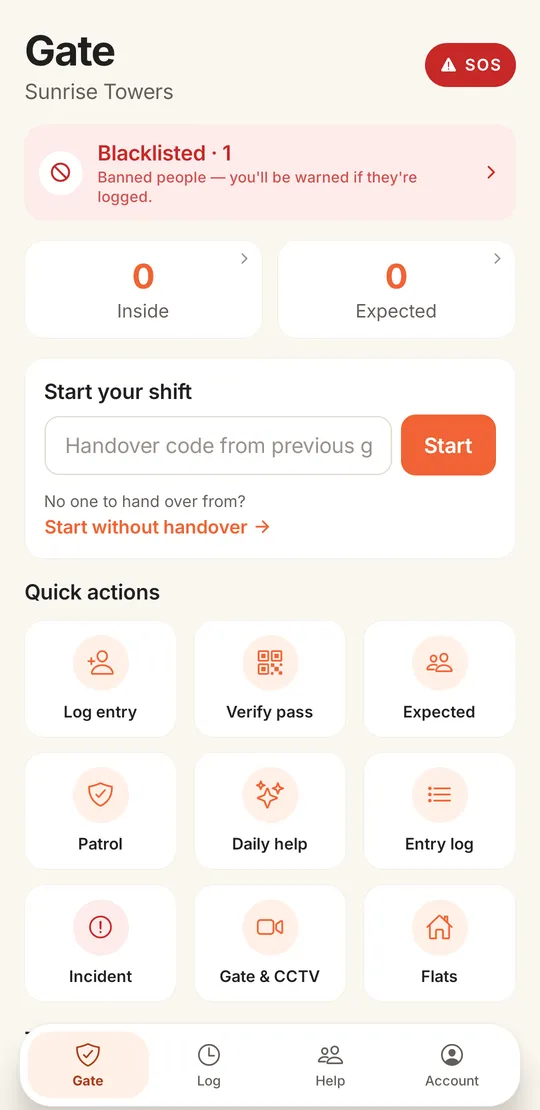
The gate screen opens with what the guard needs right now: how many visitors are inside, who is expected, the blacklist count and an SOS button. The quick actions underneath cover everything else he does in a shift.
Most of the waiting at a gate is for visitors the flat already knew about. These passes let the resident say yes in advance. Cab and delivery pre-approval, and QR codes on passes, are not available yet.
The resident creates a pass and shares its code on WhatsApp or SMS from the phone’s share menu. The guard checks the code at the gate.
For a relative or tutor who comes often, a pass that keeps working until its validity date.
Passes still in use show on the guard’s Expected list, so he can let the visitor in without calling the flat.
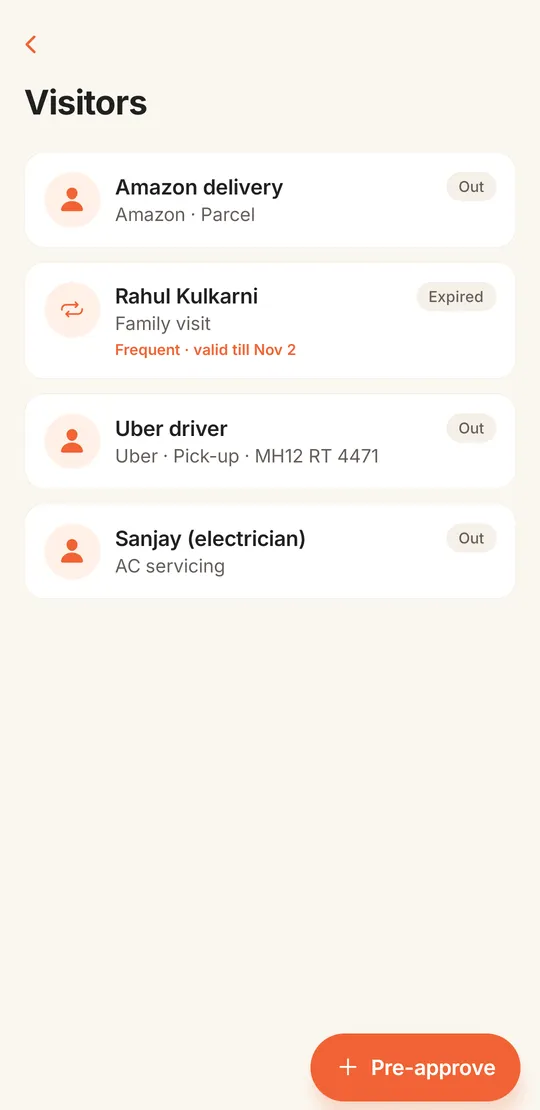
Residents see every visitor to their flat with the type and company: an Amazon parcel, a family visit on a frequent pass, an Uber pickup with its number plate, an electrician for the AC. Expired passes are marked, and a Pre-approve button sits at the bottom of the list.
| Paper register | Intercom call | SocietyConnect | |
|---|---|---|---|
| Photo of the visitor | No | No | Yes, at entry |
| Flat can refuse | Only if someone calls | Yes, if the line works | Allow or Deny on every resident’s phone |
| Pre-approved guests | No | No | Guest pass with a code |
| Entries changed later | Pages can be torn out | No record | Entries cannot be edited or deleted |
| Committee view | Read the book at the gate | None | Gate log on the web dashboard |
Hear it from us before the guard does.
We set up your wings and flats, create guard logins and train the guards at your gate, free for 90 days.
It replaces the paper register at the gate. The guard logs each visitor on a phone with a photo and the flat, the flat approves or denies on its own phone, and the society keeps a record of who came in, who approved them and when they left.
Yes. Residents create guest passes with a code they can share on WhatsApp or SMS, and frequent visitor passes with a validity date. The guard checks the code at the gate. Cab and delivery pre-approval is not available yet.
The guard sees a No answer note on the gate screen and decides according to the society’s rules. SocietyConnect does not phone the resident automatically yet.
No. Gate entries cannot be edited or deleted after they are saved, so the register stays a true record.
Not yet. The guard app is in English today, with large tiles and icons for the common visitor types. We train the guards at your gate during setup.
It is free for 90 days with every module on. After that we give a written quote based on your flats and the modules you keep.
Every module on for 90 days, visitor management included. Our team loads your flats and dues, trains your guards, and nothing is charged automatically.
Free for 90 days with every module on. Our team loads your flats and dues and trains your guards.
We will call you within one business day to connect your society.
Or message us on WhatsApp