Checkpoints you name
Add the terrace, the pump room, the basement ramp or the back gate as checkpoints from the app.
Guards start and hand over shifts with a code, scan QR stickers on their rounds and log every visitor on one phone. The committee sees the same record on the web dashboard. Part of SocietyConnect, free for 90 days.
At 2 am the committee has no idea which guard is at the gate, whether anyone walked to the basement, or who signed the night register.
Most societies run security on trust and a notebook. The agency sends whoever is free, the day guard leaves before the night guard arrives, and the patrol register gets filled in at 6 am in one handwriting. When a bicycle goes missing from the basement, nobody can say when the last round happened.
The SocietyConnect guard app puts the shift, the rounds and the gate register on the guard’s phone. A shift starts only with a handover code from the guard going off duty, or as a fresh start the committee can see. Patrol marks come from scanning a QR sticker at the spot. Every entry carries a time and a name, so the committee reads what actually happened.
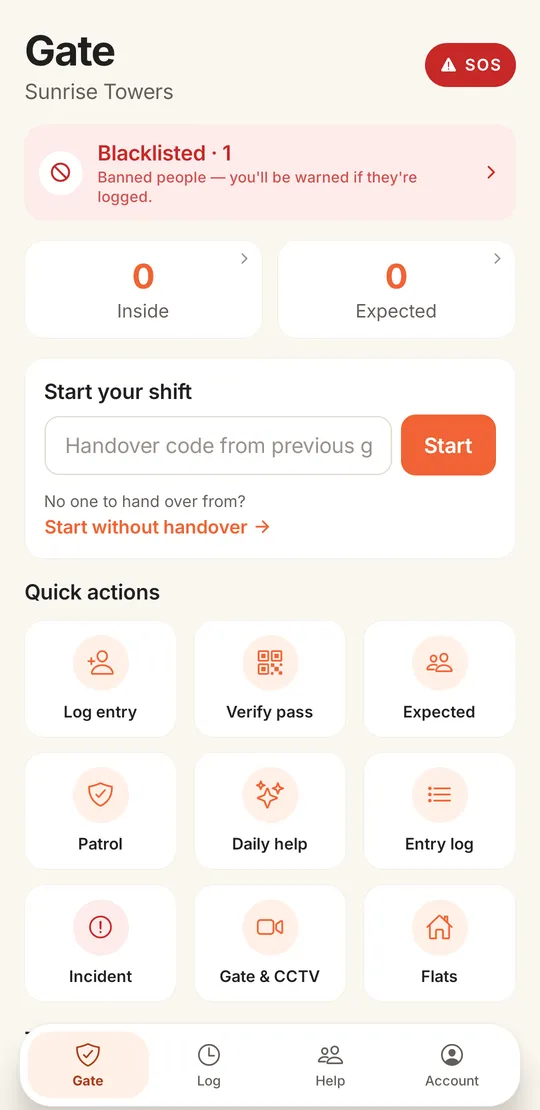
The guard opens the app to the gate screen. At the top sits a red SOS button and a blacklist card. Below are two counts, visitors inside and visitors expected, and the shift box. Nine large tiles cover the rest of the job.
A sample night at a Pune society with geofencing switched on.
The day guard taps Hand over and the app shows a 6-digit code that works for 15 minutes. He reads it out to the night guard.
The night guard types the code. The day guard’s shift closes and the new one opens. If the phone is outside the gate radius the committee set, the app asks him to move closer, or to clock in with an override that the committee can see.
While he types a name or phone number into Log entry, the app warns him if it matches the society’s blacklist.
A delivery rider logged in at 9:30 is still inside after 15 minutes. Guards get a push alert so someone can check.
He scans the QR sticker at the terrace door, the pump room and the basement ramp. Each scan is saved as a verified mark with his name and the time.
He taps Incident, picks a category and severity, adds a photo and a voice note. The committee gets a notification.
Another 6-digit code, another clean change of shift. The committee can read the whole night in the morning.
The committee decides where the checkpoints go. The guard has to be there to mark them.
Add the terrace, the pump room, the basement ramp or the back gate as checkpoints from the app.
Each checkpoint gets a QR code with a 6-character code under it. Only committee members can open it to print. Guards cannot see the codes in the app.
The guard scans the sticker or types the code printed under it. The mark is saved as verified.
A guard can mark a checkpoint by hand when the QR is damaged. It is saved as manual, so the committee can tell the two apart.
The checkpoint list shows whether each spot was marked today, at what time and by which guard.
The Safety page has a Patrol tab with every checkpoint, the recent scans and a count of scans today.
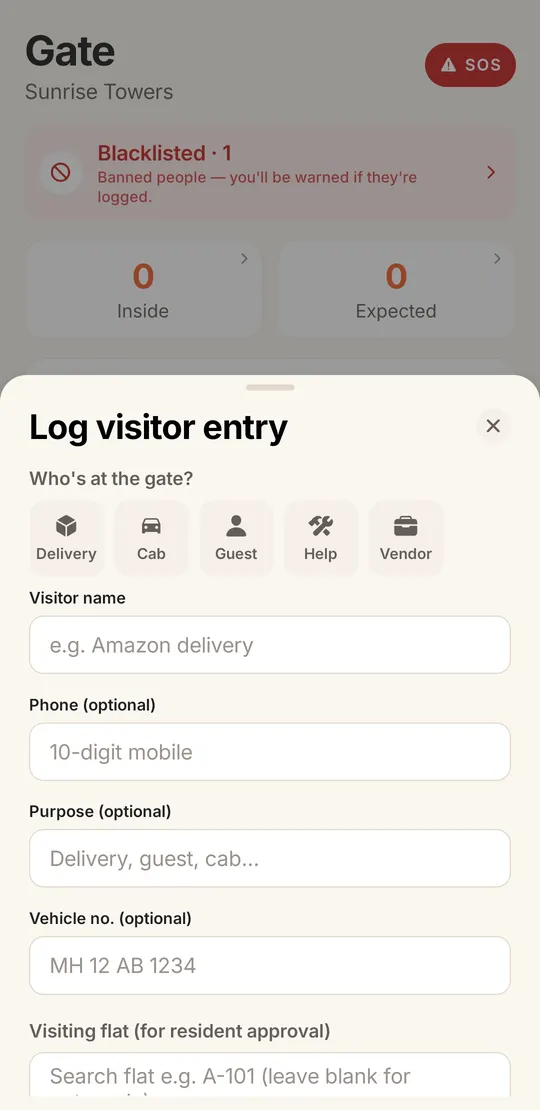
The guard picks who is at the gate (delivery, cab, guest, help or vendor), types a name, and adds a phone, vehicle number and flat if he has them. When he picks a flat, the residents get Allow or Deny on their phones. The full gate flow is on the visitor management page.
| Notebook at the gate | Agency supervisor | SocietyConnect guard app | |
|---|---|---|---|
| Who is on duty now | Ask whoever is there | A phone call | Shift record with start time and handover |
| Proof of a patrol round | A signature, often filled later | Spot checks | QR scan at each checkpoint, saved with time and name |
| Banned visitors | A list taped to the wall | Depends on the guard | Warning while the guard types the name or phone |
| Guard leaves the job | Nothing to switch off | Agency informs you | Committee disables the login from the dashboard |
| Committee view | Read the book at the gate | Monthly report | Safety page and gate log on the web dashboard |
These are the limits today. Plan your gate around them.
We create the guard logins, print your patrol QR codes with you and train each shift at the gate, free for 90 days.
It is the phone app guards use at the society gate. In SocietyConnect it covers shift start and handover, visitor entry, patrol rounds with QR checkpoints, daily help attendance, incidents and SOS. The committee sees the same records on the web dashboard.
The guard going off duty taps Hand over and gets a 6-digit code that is valid for 15 minutes. The next guard types it to start his shift, and the previous shift closes. If there is no one to hand over from, the guard can start without a code and the shift is marked as a fresh start.
Guards cannot see the checkpoint QR codes in the app. Only the committee can open them to print. A verified mark needs the guard to scan or type the code at the sticker. If he marks a checkpoint by hand, it is saved as a manual mark.
Yes. The committee stands at the gate, saves the location from the app and picks a radius. A guard outside that radius is asked to move closer. He can still clock in with an override, and the override is recorded for the committee.
Not yet. The app and the dashboard show which checkpoints were marked today, when and by whom. Scheduled rounds and missed-round alerts are not built yet.
Not yet. The guard app needs a data connection and is in English, with large tiles and icons for common tasks. We train the guards at your gate during setup.
It is free for 90 days with every module on. After that we give a written quote based on your flats and the modules you keep. Nothing is charged automatically.
Every module on for 90 days, security guard app included. Our team loads your flats and dues, trains your guards, and nothing is charged automatically.
Free for 90 days with every module on. Our team loads your flats and dues and trains your guards.
We will call you within one business day to connect your society.
Or message us on WhatsApp