Pick what happened
Theft, fight, fire, medical, property damage, suspicious activity or other.
Any resident or guard can send an SOS with their live location to the guards and the committee. Incidents are reported with photos, video and voice notes, then tracked to closure. Part of SocietyConnect, free for 90 days.
Mrs Joshi in C-702 lives alone. If she falls at 11 pm, the guard at the gate should know before her son in Bengaluru does.
In an emergency, people in a society call whoever they remember: a neighbour, the secretary, a relative in another city. The guard at the gate, who is two minutes away, is often the last to hear. Nobody knows which flat, and nobody writes down what happened afterwards.
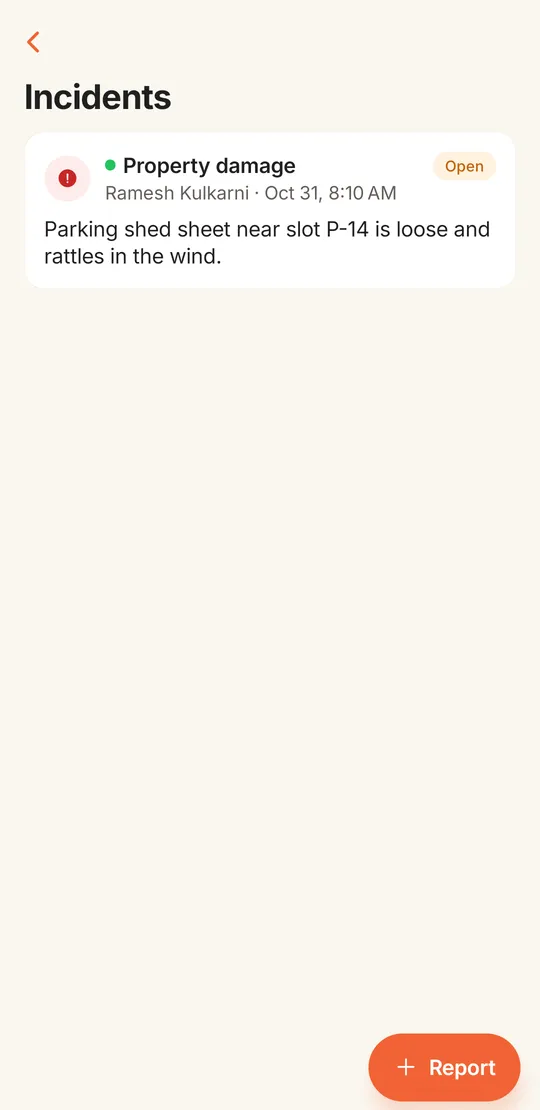
SocietyConnect sends an SOS straight to the people who can reach the flat fastest: every guard on the gate app and every committee member. The alert carries the person’s name and live location, and it stays on their screens until someone marks it resolved. Smaller problems, a fight in the parking lot or a loose sheet on the shed, go in as incident reports with evidence and a timeline.
The same steps work for a resident in a flat and a guard at the gate.
Residents find Emergency SOS in the More menu. Guards have a red SOS button on the gate screen. A confirm box stops pocket taps.
If the phone allows location, the alert carries the live position. It still goes out if location is off.
Every guard and committee member of the society gets a push notification at once.
The alert sits at the top of the guard’s gate screen and the committee’s home screen with the person’s name, whether they are a resident or a guard, and a map link.
A guard or committee member taps Resolve. The SOS log on the web dashboard keeps who resolved it and when.
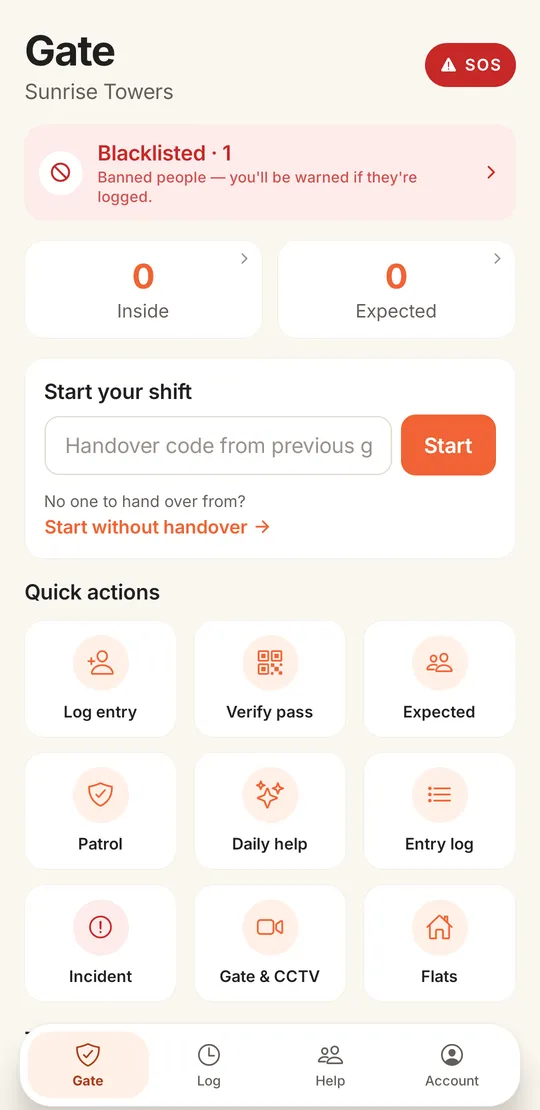
On the guard’s gate screen, SOS is the first thing at the top right, ahead of the blacklist card and the visitor counts. A guard who sees a fight or a fire at the gate can raise the alarm without leaving his post, and the same banner appears on the committee’s phones.
For things that need follow-up more than a siren. Residents and guards both report from the app.
Theft, fight, fire, medical, property damage, suspicious activity or other.
Low, medium or high. High-severity reports sort to the top of the list and are flagged in the committee’s notification.
Attach photos and videos as evidence straight from the phone.
Record a voice note when typing is slow, or when the guard would rather explain in Hindi or Marathi.
The report can carry the phone’s location, opened on a map from the incident page.
Committee members get a push notification and an in-app alert for each new report.
The incidents list shows each report with its category, who raised it, when, and its status. Open reports and high severity come first. A committee member opens a report, assigns it to someone on the committee, adds notes on what was done and moves it from open to reviewed to closed.
Each change goes into the incident’s timeline with the person’s name and time. The resident who reported it gets a push notification when the status changes, so nobody has to chase the office.
| Alert | Raised by | Goes to | Stays on record |
|---|---|---|---|
| SOS | Any resident or guard | All guards and committee members, by push | SOS log with location, status and who resolved it |
| Incident report | Residents and guards | Committee members, by push and in-app alert | Incident page with evidence, assignee and timeline |
| Incident status change | Committee | The resident who reported it | A timeline entry with the note and new status |
| Delivery or cab still inside | The gate app, after 15 minutes | Guards, by push | Visitor entry in the gate log |
| Blacklisted visitor | The gate app, while the guard types | The guard on duty | The blacklist kept by the committee |
An SOS app should be honest about what it cannot do.
We switch on SOS and incident reports, load your important contacts and show your guards what to do when the banner turns red, free for 90 days.
A resident taps Emergency SOS in the More menu, or a guard taps SOS on the gate screen, and confirms. The alert goes by push to every guard and committee member with the person’s name and live location. It stays as a red banner on their screens until someone marks it resolved.
Not yet. SOS goes to the society’s guards and committee, who are closest to your flat. Alerts to family members or outside contacts are not built yet.
The SOS still goes out with your name. The map link only appears when the phone shares its location.
Photos, videos and a voice note, along with a category, a severity and a description. The report can also carry your location.
You see your own reports and their status. Guards and the committee see all reports. The committee assigns, adds notes and closes them, and you get a notification when the status changes.
Yes. The Safety page on the web dashboard has an SOS tab with each alert, its location, its status and who resolved it, next to the incidents and patrol tabs.
It is free for 90 days with every module on. After that we give a written quote based on your flats and the modules you keep.
Every module on for 90 days, safety and sos included. Our team loads your flats and dues, trains your guards, and nothing is charged automatically.
Free for 90 days with every module on. Our team loads your flats and dues and trains your guards.
We will call you within one business day to connect your society.
Or message us on WhatsApp