Vendor directory
Each vendor with trade, phone, email, address, GSTIN, PAN and default TDS section and rate. Archive old vendors without losing their history.
Raise a purchase request, send it up a committee approval chain, turn the approved request into a vendor bill and pay it in full or in parts. Work orders, the asset register, AMC reminders and petty cash sit alongside. Part of SocietyConnect, free for 90 days.
The lift contractor’s quote went to the chairman on WhatsApp, the treasurer paid it from the bank, and three months later nobody can show who approved it.
Society spending often runs on trust and phone calls. A member of the committee gets a quote, someone says go ahead in the group, the cheque is signed, and the paper trail is a screenshot on one person’s phone. At the AGM a member asks why the painting cost more than the budget, and the committee spends the evening piecing it together.
SocietyConnect puts the approval before the payment. A purchase request records what is needed, for which head, from which vendor and for how much. It climbs the approval levels your committee set, and a rejection needs a written reason. Only a fully approved request becomes a vendor bill, and every decision on the way is in the audit trail.
Purchase requests run on the committee’s web dashboard.
Pick committee members for up to four levels, and how many at each level must approve, such as any 2 of the 3 office bearers at level 2.
Enter the purpose or expense head, amount, vendor, needed-by date and a description. It gets a number like PR/2026/0007 and goes to level 1.
If the head has a yearly budget and this request takes it over, the warning shows the new total and how far over budget it goes.
Approvers at the current level record their decision. Once the level has its quorum the request moves up. One rejection, with a reason, stops it.
A fully approved request becomes a payable expense linked to the vendor. If the vendor is new, a vendor record is created.
Pay the bill at once or in parts. TDS is deducted at the vendor’s section and rate, and each payment posts to the society’s books.
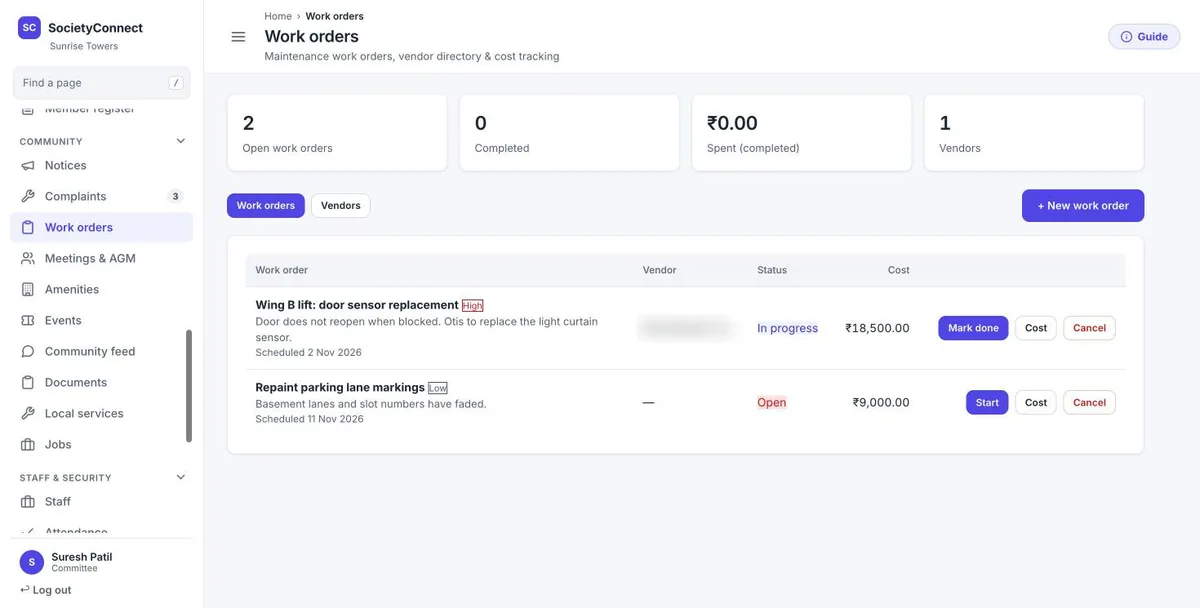
Each work order has a title, description, priority, scheduled date and vendor. It moves from open to assigned, in progress and done, and the cost is recorded against it. The page counts open and completed jobs and what has been spent on completed work.
A work order can be raised from a resident’s complaint. When it is marked done, the linked complaint is marked resolved, so the resident sees the outcome without a separate update.
Each vendor with trade, phone, email, address, GSTIN, PAN and default TDS section and rate. Archive old vendors without losing their history.
Every bill, payment and TDS deduction for one vendor, to settle a dispute or confirm a balance.
Lifts, pumps, DG sets, fire systems, CCTV and more, with location, make, model, serial number and warranty date.
Each AMC with its vendor, start and end dates and cost. Log every service visit with its cost and the next due date.
The committee gets a notification about 30 days before an AMC ends, once per contract.
Record an asset’s cost and depreciate it by straight line or written-down value. Sell or scrap it and the profit or loss is booked.
Top up the petty cash from a bank account and see opening balance, every cash entry and the closing balance for any period.
Set a yearly budget per expense head and compare actual spending with it.
Upload many vendor bills at once with TDS section, rate and input GST in each row.
An illustration for an asset bought at ₹1,00,000. Your auditor decides the method and rate for each asset.
| Straight line, 10-year life | Written-down value at 15% | |
|---|---|---|
| How it works | Cost divided by useful life, the same every year | The rate applied to the book value left each year |
| Year 1 charge | ₹10,000 | ₹15,000 |
| Year 2 charge | ₹10,000 | ₹12,750 |
| Book value after year 2 | ₹80,000 | ₹72,250 |
| On sale or scrapping | Profit or loss against book value is posted | Profit or loss against book value is posted |
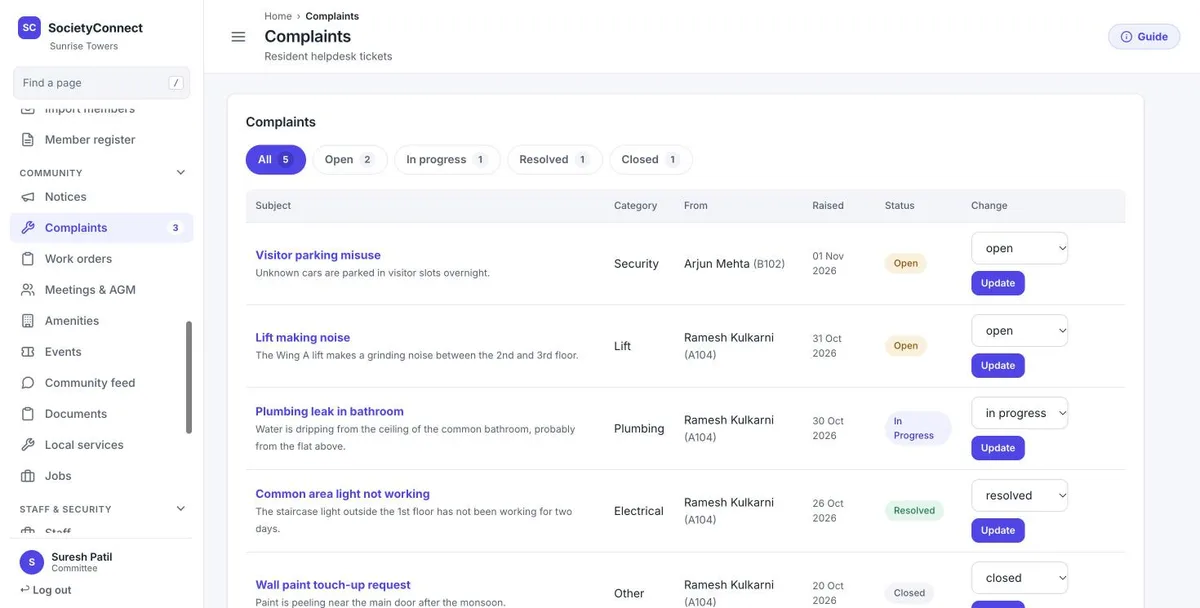
A noisy lift or a leaking pipe arrives on the Complaints page with the member’s name, flat, category and date. The committee turns it into a work order with a vendor and a date, and closing the work order resolves the complaint.
If the repair needs spending above the usual limit, raise a purchase request for it so the approval is on record before the vendor starts. See the complaint management page for how residents raise tickets.
Set your purchase rules with these in mind.
We set up your vendors, approval levels, assets and AMC dates with the committee, free for 90 days.
A committee member raises a purchase request with the head, amount and vendor. It climbs up to four approval levels that your committee sets, each with its own quorum. One rejection with a reason stops it. A fully approved request becomes a payable vendor bill.
The approval chain separates the person who raises a spend from the people who approve it, with a quorum per level. The payment step itself needs one committee user, and the system does not stop a raiser from also being an approver, so keep those roles apart when you set the chain.
Not yet. The approved purchase request goes straight to a vendor bill. There is no separate purchase order document or goods receipt step today.
Yes. Record each AMC with its vendor and dates against the asset. The committee gets a notification about 30 days before the AMC ends, and every service visit can be logged with its cost and next due date.
Each vendor record holds the PAN and default TDS section and rate. TDS is deducted when the bill is paid, including on part payments, and appears in the TDS 26Q report and Form 16A.
Yes. Each fixed asset can use straight line or written-down value depreciation. When an asset is sold or scrapped, the profit or loss against book value is posted. Your auditor decides the method and rate.
Yes. Every module is free for 90 days, with no card needed and nothing charged automatically. After that we give a written quote.
Every module on for 90 days, vendors, purchases and assets included. Our team loads your flats and dues, trains your guards, and nothing is charged automatically.
Free for 90 days with every module on. Our team loads your flats and dues and trains your guards.
We will call you within one business day to connect your society.
Or message us on WhatsApp